Playback starts YouTube’s embedded player (privacy-enhanced mode).
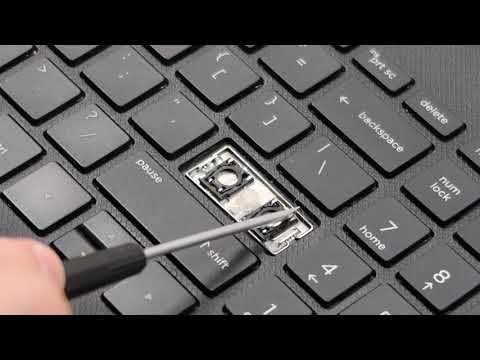
How To Fix - HP Laptop Key Replacement / Repair for Large Keys Space Enter Shift Ctrl Backspace Tab
ChannelPC MonkeyDescription from the creator
Use this video if you need to replace a larger key on an HP laptop keyboard such as Space, Enter, Shift, etc. If you would like to see a smaller letter key done, view this video; youtu.be/M-aYew3NSv8. To troubleshoot why a key or keys are not working, refer to this video; youtu.be/wqrchfpdJ_w.
Check out the FAQ's and the Related Links below for more helpful info !!
Please remember to Like, Share and Subscribe if this was helpful !!
Please subscribe to youtube.com/@JamTechs where I give you 5 minute or less videos about cool tech!
Related Links:
Laptop Tools, Components & Accessories: amzn.to/3XpHdlw
HDD & SSD Replacement / Upgrades: amzn.to/430vkEz
FAQ's:
Q: My Key Cap will not click down in place correctly. What's wrong?
A: If the key assembly is not installing correctly, its either due to a component being damaged and needing to be replaced or a component not being orientated correctly. I would disassemble the key as seen here in this video and inspect for damage. If there is no damage, install the key. If there is damage, replace the key. Would you like help locating a key? If so, what is the brand and model for your computer?
Q: Where can I purchase replacement keys?
A: If you break or damage any component of the key assembly, you would have to replace it. I usually get my keys on Ebay or www.replacementlaptopkeys.com. If you cannot find a loose key for sale, you may have to purchase a keyboard and take a key from there.
Q: I have a Key or Keys that are not working. Will this fix them?
A: This video is a tutorial on how to replace a key. If your keys are not working but are not mechanically broken, troubleshoot them as seen here; youtu.be/wqrchfpdJ_w.
Q: The hinge clip came apart into two pieces. How can I reassemble?
A: They fit together with a small plastic pin on the left and right of the inner clip. These fit into holes on the outer clip. To see exactly how the inner clip sits in the outer clip, remove another key cap and copy the clip under it.
Q: The rubber spring came off. How do I reattach it?
A: There isn't really a good way to reattach those. They are not meant to be replaced. Best advice is try to use a small amount of glue. If that does not work, you may have to replace the keyboard.
Q: The Hinge Clip came off with the Key Cap. What do I do?
A: Because they key can usually not be reinstalled with the Retainer Clip and the Key Cap still attached to each other, you would have to separate them as seen here, using a small flat pry tool.
(8/25)
Check out the FAQ's and the Related Links below for more helpful info !!
Please remember to Like, Share and Subscribe if this was helpful !!
Please subscribe to youtube.com/@JamTechs where I give you 5 minute or less videos about cool tech!
Related Links:
Laptop Tools, Components & Accessories: amzn.to/3XpHdlw
HDD & SSD Replacement / Upgrades: amzn.to/430vkEz
FAQ's:
Q: My Key Cap will not click down in place correctly. What's wrong?
A: If the key assembly is not installing correctly, its either due to a component being damaged and needing to be replaced or a component not being orientated correctly. I would disassemble the key as seen here in this video and inspect for damage. If there is no damage, install the key. If there is damage, replace the key. Would you like help locating a key? If so, what is the brand and model for your computer?
Q: Where can I purchase replacement keys?
A: If you break or damage any component of the key assembly, you would have to replace it. I usually get my keys on Ebay or www.replacementlaptopkeys.com. If you cannot find a loose key for sale, you may have to purchase a keyboard and take a key from there.
Q: I have a Key or Keys that are not working. Will this fix them?
A: This video is a tutorial on how to replace a key. If your keys are not working but are not mechanically broken, troubleshoot them as seen here; youtu.be/wqrchfpdJ_w.
Q: The hinge clip came apart into two pieces. How can I reassemble?
A: They fit together with a small plastic pin on the left and right of the inner clip. These fit into holes on the outer clip. To see exactly how the inner clip sits in the outer clip, remove another key cap and copy the clip under it.
Q: The rubber spring came off. How do I reattach it?
A: There isn't really a good way to reattach those. They are not meant to be replaced. Best advice is try to use a small amount of glue. If that does not work, you may have to replace the keyboard.
Q: The Hinge Clip came off with the Key Cap. What do I do?
A: Because they key can usually not be reinstalled with the Retainer Clip and the Key Cap still attached to each other, you would have to separate them as seen here, using a small flat pry tool.
(8/25)
About this tutorial
PC Monkey published this 6:27 video tutorial on November 7, 2019. It has been watched 369,994 times on YouTube.
- Channel
- PC Monkey
- Category
- People & Blogs
- Duration
- 6:27
- Published
- November 7, 2019
- Views
- 369,994
- Likes
- 2,277
Share
This tutorial in other languages
- FRComment réparer - HP PC Portable Key / Réparation Grandes touches Maj Ctrl Espace Entrer Backspace Tab
- ESCómo corregir - Laptop HP llave de reemplazo / reparación de Teclas grandes Espacio Enter Shift Ctrl Retroceso Tab
- PTComo corrigir - HP Laptop Key substituição / reparação de chaves grandes Espaço Enter Mudança Ctrl Backspace Tab
- ITCome risolvere - HP Laptop chiave sostituzione / riparazione per i grandi tasti Spazio Invio Maiusc Ctrl Tab Backspace
- DEFix How To - HP Laptop Key Ersatz / Reparatur-Service für große Tasten Verändern Geben Sie Strg Rück Tab
- NLHow To Fix - HP Laptop Key Vervanging / Reparatie grote toetsen spatie Shift Ctrl Backspace Tab
- RUКак исправить - HP ноутбук ключ замены / ремонта для больших ключей пространства Enter Сдвиг Ctrl Backspace Tab
- PLJak ustalić - laptop HP Key Replacement / Naprawy w duże klawisze Shift, Ctrl Enter przestrzeni Backspace Tab
- JA修正するにはどのように - 大型キースペースのためのHPのノートパソコンのキー交換/修理は、ShiftキーCtrlキーバックスペース]タブを入力します。
- ARكيفية إصلاح - HP كمبيوتر محمول مفتاح استبدال / إصلاح لمفاتيح كبيرة الفضاء أدخل التحول السيطرة مسافة للخلف تبويب
- HIठीक करने के लिए कैसे - HP लैपटॉप कुंजी रिप्लेसमेंट / बड़े कुंजी अंतरिक्ष के लिए मरम्मत दर्ज शिफ्ट Ctrl बैकस्पेस टैब
- IDBagaimana Untuk Perbaiki - HP Laptop Key Penggantian / Perbaikan untuk Keys besar Ruang Masukkan Pergeseran Ctrl Backspace Tab