Playback starts YouTube’s embedded player (privacy-enhanced mode).
How to remove highlights or background color from pasted text in Microsoft Word
ChannelViral VideosDescription from the creator
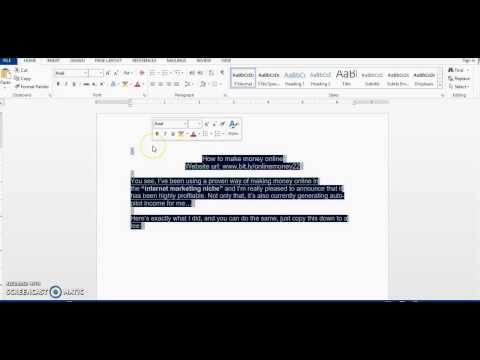
bit.ly/watch-for-free_ How to remove highlights or background color from pasted text (from a website) in Microsoft Word - See the 3 Methods.
Is it that when you paste text into word from a website, there appears to be a color background or highlight to the text that you cannot remove? Or is it that Each time you copy text from a Google Docs file and paste it into Microsoft Word, the text carries with it a faint yellow highlight. This video will show you 3 methods on how to remove highlights/background color from text copied in microsoft word.
Get rid of/ remove highlighted text or background color from pasted text in microsoft word fast and easy by watching the video or the following instructions below:
Method 1:
Instructions for 'How to remove text highlight/ background colors from pasted text in microsoft word':
1. Block or highlight the area that you want to remove the highlights formatting from
2. On your keyboard, press ctrl+spacebar.
I think this should work for all microsoft word versions; 2003, 2007, 2010, 2013, 2016.
Method 2:
Instructions for 'How to remove text highlight/ background colors from pasted text in microsoft word':
1. Block or highlight the area that you want to remove the highlights formatting from
2. Click Home tab
3. Go to Paragraph section
4. click the down arrow on the 'paint bucket' icon; This icon is called 'shading'
5. select "no color"
Method 3:
Instructions for 'How to remove text highlight/ background colors from pasted text in microsoft word':
1. Block or highlight the area that you want to remove the highlights formatting from
2. Go to the 'Design' Tab
3. Click 'page border' (upper right hand side of page)
4. Click 'shading' tab
5. Select 'No color' in the 'fill' section
6. Select 'Text' in 'apply to' section
Associated Keywords:
-How to remove highlights or background color from pasted text in Microsoft Word
-remove background color in ms word
-remove highlights in ms word
-remove highlights in microsoft word
-remove background color in microsoft word
Thanks for watching!!
Is it that when you paste text into word from a website, there appears to be a color background or highlight to the text that you cannot remove? Or is it that Each time you copy text from a Google Docs file and paste it into Microsoft Word, the text carries with it a faint yellow highlight. This video will show you 3 methods on how to remove highlights/background color from text copied in microsoft word.
Get rid of/ remove highlighted text or background color from pasted text in microsoft word fast and easy by watching the video or the following instructions below:
Method 1:
Instructions for 'How to remove text highlight/ background colors from pasted text in microsoft word':
1. Block or highlight the area that you want to remove the highlights formatting from
2. On your keyboard, press ctrl+spacebar.
I think this should work for all microsoft word versions; 2003, 2007, 2010, 2013, 2016.
Method 2:
Instructions for 'How to remove text highlight/ background colors from pasted text in microsoft word':
1. Block or highlight the area that you want to remove the highlights formatting from
2. Click Home tab
3. Go to Paragraph section
4. click the down arrow on the 'paint bucket' icon; This icon is called 'shading'
5. select "no color"
Method 3:
Instructions for 'How to remove text highlight/ background colors from pasted text in microsoft word':
1. Block or highlight the area that you want to remove the highlights formatting from
2. Go to the 'Design' Tab
3. Click 'page border' (upper right hand side of page)
4. Click 'shading' tab
5. Select 'No color' in the 'fill' section
6. Select 'Text' in 'apply to' section
Associated Keywords:
-How to remove highlights or background color from pasted text in Microsoft Word
-remove background color in ms word
-remove highlights in ms word
-remove highlights in microsoft word
-remove background color in microsoft word
Thanks for watching!!
About this tutorial
Viral Videos published this 1:55 video tutorial on November 4, 2017. It has been watched 972,947 times on YouTube.
- Channel
- Viral Videos
- Category
- People & Blogs
- Duration
- 1:55
- Published
- November 4, 2017
- Views
- 972,947
- Likes
- 10,651
Tags
Share
This tutorial in other languages
- FRComment faire pour supprimer les temps forts ou la couleur de fond du texte collé dans Microsoft Word
- ES¿Cómo eliminar toques de luz o color de fondo del texto pegado en Microsoft Word
- PTComo remover destaques ou cor de fundo do texto colado no Microsoft Word
- ITCome rimuovere luci o colore di sfondo da testo incollato in Microsoft Word
- DEWie Highlights oder Hintergrundfarbe aus eingefügten Text in Microsoft Word entfernen
- NLHoe maak je highlights of de achtergrondkleur te verwijderen uit geplakte tekst in Microsoft Word
- RUКак удалить основные моменты или цвет фона из вставленного текста в Microsoft Word
- PLJak usunąć pasemka lub kolor tła z wklejonym tekstem w programie Microsoft Word
- JAMicrosoft Wordで貼り付けたテキストからハイライトや背景色を削除する方法
- ARكيفية إزالة أو يسلط الضوء على لون الخلفية من النص الذي تم لصقه في Microsoft Word
- HIमाइक्रोसॉफ्ट वर्ड में चिपकाया पाठ से प्रकाश डाला या पृष्ठभूमि रंग निकालने का तरीका
- IDBagaimana menghapus menyoroti atau warna latar belakang dari teks disisipkan di Microsoft Word