Playback starts YouTube’s embedded player (privacy-enhanced mode).
How to access a blocked website by using proxies
ChannelGuido's How-to'sDescription from the creator
How to access a blocked website by using proxies
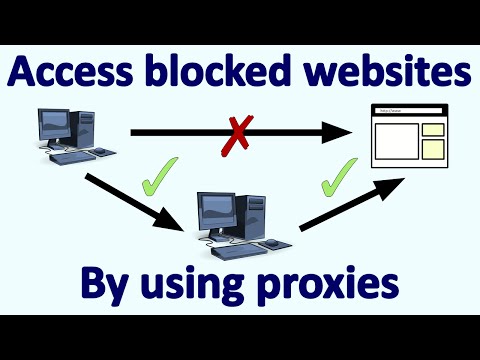
If you want to visit a blocked website, you can do so by making use of proxies.
In this video, I'm using proxysite.com/, and proxylist.hidemyass.com/.
#proxies
Follow me on other media:
►Website: guidoshowtos.com
►Facebook: facebook.com/guidoshowtos
►Twitter: twitter.com/guidoshowtos
Music used:
Cool Rock (incompetech.com)
Annotations:
In the previous video, I showed how to block a
website by editing the hosts file.
I blocked www.bing.com, and still have this
block in place.
You can use a proxy to access blocked sites. There are 2 methods of using proxies: using a proxy site, and by editing your browser settings.
A proxy browsing site has an address bar that you can use to browse the web through a proxy. Here, I'm using www.proxysite.com.
Simply enter the URL you want to visit, and
click 'Go!' to start browsing.
I can now access www.bing.com, bypassing the
block!
First, you'll need to find a proxy IP address and port that you can use. In this example, I'm using proxylist.hidemyass.com to find one.
Copy a proxy IP address, and remember the
port number.
In Google Chrome, click The menu icon (☰),
and then click 'Settings'.
Scroll down, and click 'Show advanced
settings...'. Scroll down further, and click the
button that says 'Change proxy settings...'.
Click 'LAN settings'. Check the checkbox to
"Use a proxy server for your LAN".
Paste the proxy IP address in the text box
labeled 'Address:'. Enter the port number in the
text box labeled 'Port:'.
In my case the port number is '80', so I don't
need to change this.
Click 'OK', and then click 'OK' again.
Refreshing www.bing.com... and it works!
If you want to visit a blocked website, you can do so by making use of proxies.
In this video, I'm using proxysite.com/, and proxylist.hidemyass.com/.
#proxies
Follow me on other media:
►Website: guidoshowtos.com
►Facebook: facebook.com/guidoshowtos
►Twitter: twitter.com/guidoshowtos
Music used:
Cool Rock (incompetech.com)
Annotations:
In the previous video, I showed how to block a
website by editing the hosts file.
I blocked www.bing.com, and still have this
block in place.
You can use a proxy to access blocked sites. There are 2 methods of using proxies: using a proxy site, and by editing your browser settings.
A proxy browsing site has an address bar that you can use to browse the web through a proxy. Here, I'm using www.proxysite.com.
Simply enter the URL you want to visit, and
click 'Go!' to start browsing.
I can now access www.bing.com, bypassing the
block!
First, you'll need to find a proxy IP address and port that you can use. In this example, I'm using proxylist.hidemyass.com to find one.
Copy a proxy IP address, and remember the
port number.
In Google Chrome, click The menu icon (☰),
and then click 'Settings'.
Scroll down, and click 'Show advanced
settings...'. Scroll down further, and click the
button that says 'Change proxy settings...'.
Click 'LAN settings'. Check the checkbox to
"Use a proxy server for your LAN".
Paste the proxy IP address in the text box
labeled 'Address:'. Enter the port number in the
text box labeled 'Port:'.
In my case the port number is '80', so I don't
need to change this.
Click 'OK', and then click 'OK' again.
Refreshing www.bing.com... and it works!
About this tutorial
Guido's How-to's published this 2:32 video tutorial on November 1, 2015. It has been watched 47,042 times on YouTube.
- Channel
- Guido's How-to's
- Category
- Science & Technology
- Duration
- 2:32
- Published
- November 1, 2015
- Views
- 47,042
- Likes
- 217
Tags
Share
This tutorial in other languages
- FRComment accéder à un site Web bloqué en utilisant des proxies
- ES¿Cómo acceder a un sitio web bloqueado por el uso de proxies
- PTComo acessar um site bloqueado usando proxies
- ITCome per accedere a un sito web bloccato tramite proxy
- DEWie eine blockierte Website zuzugreifen, indem Proxies
- NLHoe toegang krijgen tot een geblokkeerde website met behulp van proxies
- RUКак получить доступ к заблокированный веб-сайт, используя прокси
- PLJak uzyskać dostęp do zablokowanego internetową za pomocą serwerów proxy
- JAプロキシを使用してブロックされたWebサイトにアクセスする方法
- ARكيفية الوصول إلى موقع محجوب عن طريق استخدام وكلاء
- HIप्रॉक्सी का उपयोग करके एक अवरुद्ध वेबसाइट का उपयोग कैसे करें
- IDCara mengakses situs yang diblokir dengan menggunakan proxy