Playback starts YouTube’s embedded player (privacy-enhanced mode).
How to Convert MP4 Files to WMV
ChannelHowcastDescription from the creator
Full Playlist: youtube.com/playlist?list=PLLALQuK1NDri8wmmLlkp…
-
-
Watch more Digital Music & Music Downloads videos: howcast.com/videos/408885-How-to-Convert-MP4-Fi…
You've tried opening an MP4 file in Windows Media Player and it won't play. Convert the file to a WMV and watch that hilarious video over and over again.
Step 1: Download converter
Download a free copy of an MP4 to WMV converter, such as WinFF.
Step 2: Add MP4 to conversion window
Add the MP4 file to the conversion window of the converter program, by clicking the Add button.
Tip
If you use a different converter, the buttons may be slightly different, but the process to convert will generally be the same.
Step 3: Choose Microsoft format
Choose the Microsoft format from the Convert To drop-down menu.
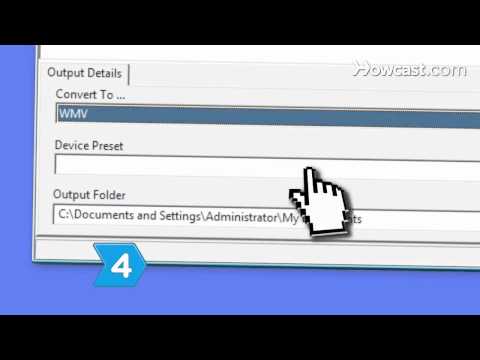
Step 4: Choose WMV format
Choose the WMV generic format from the Device Preset drop-down menu.
Step 5: Select the save location
Select the file location for the new WMV file in the Output Folder address bar.
Step 6: Click Convert
Click Convert to begin the file conversion.
Step 7: Open the file
Open the file from the preselected output folder or from within Windows Media Player to test it for usability and play it as many times as you like.
Did You Know?
The first movie studio in the United States, The Black Maria, was built by Thomas Edison in 1893 in West Orange, New Jersey.
-
-
Watch more Digital Music & Music Downloads videos: howcast.com/videos/408885-How-to-Convert-MP4-Fi…
You've tried opening an MP4 file in Windows Media Player and it won't play. Convert the file to a WMV and watch that hilarious video over and over again.
Step 1: Download converter
Download a free copy of an MP4 to WMV converter, such as WinFF.
Step 2: Add MP4 to conversion window
Add the MP4 file to the conversion window of the converter program, by clicking the Add button.
Tip
If you use a different converter, the buttons may be slightly different, but the process to convert will generally be the same.
Step 3: Choose Microsoft format
Choose the Microsoft format from the Convert To drop-down menu.
Step 4: Choose WMV format
Choose the WMV generic format from the Device Preset drop-down menu.
Step 5: Select the save location
Select the file location for the new WMV file in the Output Folder address bar.
Step 6: Click Convert
Click Convert to begin the file conversion.
Step 7: Open the file
Open the file from the preselected output folder or from within Windows Media Player to test it for usability and play it as many times as you like.
Did You Know?
The first movie studio in the United States, The Black Maria, was built by Thomas Edison in 1893 in West Orange, New Jersey.
About this tutorial
Howcast published this 1:28 video tutorial on October 27, 2011. It has been watched 165,618 times on YouTube.
- Channel
- Howcast
- Category
- Science & Technology
- Duration
- 1:28
- Published
- October 27, 2011
- Views
- 165,618
- Likes
- 517
Tags
Share
This tutorial in other languages
- FRComment convertir des fichiers MP4 en WMV
- ESCómo convertir archivos MP4 a WMV
- PTComo converter arquivos MP4 para WMV
- ITCome convertire i file MP4 in WMV
- DEWie Konvertieren von MP4-Dateien in WMV
- NLHoe kan ik MP4 bestanden te converteren naar WMV
- RUКак конвертировать файлы MP4 в WMV
- PLJak konwertować pliki MP4, WMV
- JAWMVへのMP4ファイルを変換する方法
- ARكيفية تحويل ملفات MP4 إلى WMV
- HIMP4 फ़ाइलों में कनवर्ट करने के लिए कैसे WMV करने के लिए
- IDCara Mengkonversi File MP4 WMV