Playback starts YouTube’s embedded player (privacy-enhanced mode).
How to Setup External Graphics Card on a Laptop for CHEAP !! - eGPU Tutorial (2019)
ChannelTricK i KnowIn brief
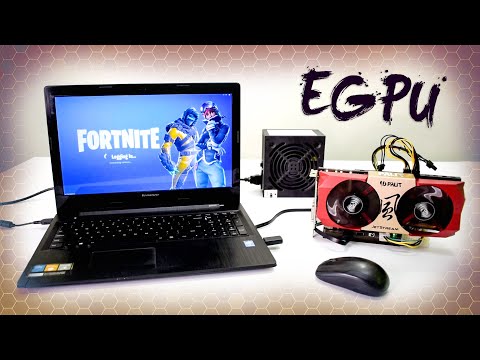
Turn an older laptop into a gaming machine by adding an external graphics card using an EXP GDC dock. This tutorial covers selecting the right dock, adjusting BIOS settings for compatibility, and configuring drivers—ideal for gamers with compatible Lenovo, Acer, ThinkPad, or other laptops.
Key steps
- Choose the correct EXP GDC dock (NGFF, Mini PCIe) for your laptop’s slot.
- Plug the eGPU dock cable into the laptop’s empty slot.
- Adjust BIOS settings (e.g., disable integrated graphics, enable PCIe boot).
- Connect the external GPU and power supply to the dock.
- Install the NVIDIA graphics driver and set it as default.
- Use a USB wireless adapter for internet if WiFi is disabled.
- Test performance by playing games like Fortnite or Shadow of the Tomb Raider.
Questions & answers
Which laptops work with this setup?
Lenovo (G50-70), Acer, ThinkPad, Alienware, Clevo, HP, and Dell—if BIOS settings match the guide.
Do I need an external monitor?
No, the setup allows gaming directly on the laptop screen.
What GPU models are recommended?
The creator uses GTX 750 Ti, GTX 1060, or GTX 1650 as examples.
Description from the creator
Put a desktop graphics card on laptop to play new games on your old laptop !! Yes guys this video is about how to set up an external graphics card for a laptop using the magical product called "EXP GDC Graphics Card Dock", this device will turn your old laptop into a gaming machine. Below is the list of items you need to buy before doing this setup:
🧐 Buy eGPU dock + accessories: wp.me/p6iZSs-jh (my Blog Link)
or
buy direct here
⚡️ Exp Gdc [All Version] : bit.ly/3Yj4RRc (Banggood) 🌍
⚡️ Exp Gdc [NGFF Version] : bit.ly/3ghDhQH (Ali Express) 🌍
⚡️ Exp Gdc [NGFF Version] : geni.us/expgdcngf (Amazon) 🌍
⚡️ Exp Gdc [NGFF Version] : bit.ly/3PRkOHx (Banggood) 🌍
⚡️ Exp Gdc [Mini PCIe Version] : bit.ly/36YWU8c (Banggood) 🛒🌍
NOTE: Check my blog for other dock versions.
⚡️ My Trusted GPU 1 GTX 750ti: bit.ly/2zOgIMY
⚡️ My Trusted GPU 2 GTX 1060: bit.ly/2p9qX9I
⚡️ My Trusted GPU 3 GTX 1650: geni.us/egpLpa
⚡️ Cheap Power Supply: bit.ly/2iN6rJJ
⚡️ Corsair VS450 PSU: geni.us/egpvs450
EXTRA ITEMS:
⚡️ Wireless USB Adapter: geni.us/TP-WiFi
⚡️ Dell MK636 Wireless Kbd Mouse: geni.us/DellMK636
This whole setup is based on a Lenovo laptop, I am using a Lenovo g50-70 and Gtx 760 Graphics card as an example. But you can install it on any laptop with the correct settings and compatibility. Below are some settings for different laptops brand:
-- Lenovo, Acer: BIOS-Graphic Device-UMA(Graphic Mode-Integrated), PXE Boot to LAN(Network Boot)-Disabled。
-- THINKPAD: BIOS-Config-Display-Graphics device-Integrated graphics.OS Detection for NVIDIA Optimus-Disabled
-- Alienware, Clevo: BIOS-Primary display-IGFX or PCI
-- HP, DELL: Boot Sequence-Onboard NIC untick, System Configuration-Integrated NIC- Disabled, Power Management-Wake on LAN/WLAN- Disabled
▶▶ What's Inside this video and timing (INDEX):
- How to Setup External Graphics Card on Laptop: 0:00
- Types of egpu docks and their uses: 01:12
- External Graphics Card tutorial starts at: 04:53
- How to find WiFi LAN card inside Laptop: 05:35
- How to plug eGPU Cable in laptop: 06:31
- Lenovo Laptop Bios Settings for eGPU setup: 07:20
- Power Supply Settings for the setup: 08:09
- How to Check and Install Graphics Driver: 10:00
- How to make Nvidia Graphics default: 12:20
- How to connect to the internet without a WiFi LAN card: 13:29
- Playing Fortnite with the Gtx 760 Graphics card: 14:23
- Playing PUBG with the egpu setup: 15:30
- Play games without external monitor: 16:08
- Playing Shadow of the Tomb Raider: 17:38
- Playing Assassins Creed Odyssey: 18:57
- Which Exp GDC Version is supported by your laptop: 20:28
- Total Cost of egpu including PSU & GPU: 20:55
With the product, you will get an egpu dock, NGFF Cable, Power Connector, and a User manual with all instructions. But my video will help you to do the things step by step easier.
I already did a video on a Dell Laptop with different settings and using a Mini PCIe Version Exp GDC Graphics card Dock. You can Check out that video here: youtu.be/PJabK8TfyOA
Thank you for watching How to install an external GPU on a Laptop, if this video is helpful to you give this video a thumbs up and SUBSCRIBE my channel for more videos like this.
▶▶ If you Like my video plz SUBSCRIBE: bit.ly/SubscribeTrickiKnow ❤
▶▶ eGPU Video on Lattepanda Alpha (SBC): youtu.be/OGCLXPDPtfk
DISCLAIMER: This video's description contains affiliate links, which means that if you click on one of the product links, I’ll receive a small commission and you lose nothing. This helps support the channel and allows us to continue to make videos like this. Thank you for the support!!
🧐 Buy eGPU dock + accessories: wp.me/p6iZSs-jh (my Blog Link)
or
buy direct here
⚡️ Exp Gdc [All Version] : bit.ly/3Yj4RRc (Banggood) 🌍
⚡️ Exp Gdc [NGFF Version] : bit.ly/3ghDhQH (Ali Express) 🌍
⚡️ Exp Gdc [NGFF Version] : geni.us/expgdcngf (Amazon) 🌍
⚡️ Exp Gdc [NGFF Version] : bit.ly/3PRkOHx (Banggood) 🌍
⚡️ Exp Gdc [Mini PCIe Version] : bit.ly/36YWU8c (Banggood) 🛒🌍
NOTE: Check my blog for other dock versions.
⚡️ My Trusted GPU 1 GTX 750ti: bit.ly/2zOgIMY
⚡️ My Trusted GPU 2 GTX 1060: bit.ly/2p9qX9I
⚡️ My Trusted GPU 3 GTX 1650: geni.us/egpLpa
⚡️ Cheap Power Supply: bit.ly/2iN6rJJ
⚡️ Corsair VS450 PSU: geni.us/egpvs450
EXTRA ITEMS:
⚡️ Wireless USB Adapter: geni.us/TP-WiFi
⚡️ Dell MK636 Wireless Kbd Mouse: geni.us/DellMK636
This whole setup is based on a Lenovo laptop, I am using a Lenovo g50-70 and Gtx 760 Graphics card as an example. But you can install it on any laptop with the correct settings and compatibility. Below are some settings for different laptops brand:
-- Lenovo, Acer: BIOS-Graphic Device-UMA(Graphic Mode-Integrated), PXE Boot to LAN(Network Boot)-Disabled。
-- THINKPAD: BIOS-Config-Display-Graphics device-Integrated graphics.OS Detection for NVIDIA Optimus-Disabled
-- Alienware, Clevo: BIOS-Primary display-IGFX or PCI
-- HP, DELL: Boot Sequence-Onboard NIC untick, System Configuration-Integrated NIC- Disabled, Power Management-Wake on LAN/WLAN- Disabled
▶▶ What's Inside this video and timing (INDEX):
- How to Setup External Graphics Card on Laptop: 0:00
- Types of egpu docks and their uses: 01:12
- External Graphics Card tutorial starts at: 04:53
- How to find WiFi LAN card inside Laptop: 05:35
- How to plug eGPU Cable in laptop: 06:31
- Lenovo Laptop Bios Settings for eGPU setup: 07:20
- Power Supply Settings for the setup: 08:09
- How to Check and Install Graphics Driver: 10:00
- How to make Nvidia Graphics default: 12:20
- How to connect to the internet without a WiFi LAN card: 13:29
- Playing Fortnite with the Gtx 760 Graphics card: 14:23
- Playing PUBG with the egpu setup: 15:30
- Play games without external monitor: 16:08
- Playing Shadow of the Tomb Raider: 17:38
- Playing Assassins Creed Odyssey: 18:57
- Which Exp GDC Version is supported by your laptop: 20:28
- Total Cost of egpu including PSU & GPU: 20:55
With the product, you will get an egpu dock, NGFF Cable, Power Connector, and a User manual with all instructions. But my video will help you to do the things step by step easier.
I already did a video on a Dell Laptop with different settings and using a Mini PCIe Version Exp GDC Graphics card Dock. You can Check out that video here: youtu.be/PJabK8TfyOA
Thank you for watching How to install an external GPU on a Laptop, if this video is helpful to you give this video a thumbs up and SUBSCRIBE my channel for more videos like this.
▶▶ If you Like my video plz SUBSCRIBE: bit.ly/SubscribeTrickiKnow ❤
▶▶ eGPU Video on Lattepanda Alpha (SBC): youtu.be/OGCLXPDPtfk
DISCLAIMER: This video's description contains affiliate links, which means that if you click on one of the product links, I’ll receive a small commission and you lose nothing. This helps support the channel and allows us to continue to make videos like this. Thank you for the support!!
About this tutorial
TricK i Know published this 22:27 video tutorial on October 26, 2019. It has been watched 4,026,216 times on YouTube.
- Channel
- TricK i Know
- Category
- Science & Technology
- Duration
- 22:27
- Published
- October 26, 2019
- Views
- 4,026,216
- Likes
- 70,842
Tags
Share
This tutorial in other languages
- FRComment installer la carte graphique externe sur un ordinateur portable pour CHEAP !! - eGPU Tutorial (2019)
- ESCómo configurar la tarjeta gráfica externa en un ordenador portátil para BARATO !! - eGPU Tutorial (2019)
- PTComo a configuração placa gráfica externa em um Laptop para barato !! - eGPU Tutorial (2019)
- ITCome impostare scheda grafica esterna su un computer portatile a buon mercato !! - eGPU Tutorial (2019)
- DEWie Setup Externe Grafikkarte auf einem Laptop für CHEAP !! - eGPU Tutorial (2019)
- NLHoe je externe grafische kaart op een Laptop voor GOEDKOOP !! - eGPU Tutorial (2019)
- RUКак Настройка внешней видеокарты на ноутбуке за дешево !! - ЕГП Учебное пособие (2019)
- PLJak skonfigurować zewnętrznej karty graficznej w laptopie tanich !! - eGPU Tutorial (2019)
- JAどのようにセットアップ外部グラフィックスカードにCHEAPのためのラップトップに! - eGPUチュートリアル(2019)
- ARكيفية إعداد بطاقة الرسومات الخارجية على الكمبيوتر المحمول لCHEAP !! - eGPU دروس (2019)
- HIकैसे सेटअप बाहरी ग्राफिक्स कार्ड के लिए सस्ती के लिए एक लैपटॉप पर !! - eGPU ट्यूटोरियल (2019)
- IDCara Setup Kartu Grafis Eksternal pada Laptop untuk MURAH !! - eGPU Tutorial (2019)