Playback starts YouTube’s embedded player (privacy-enhanced mode).
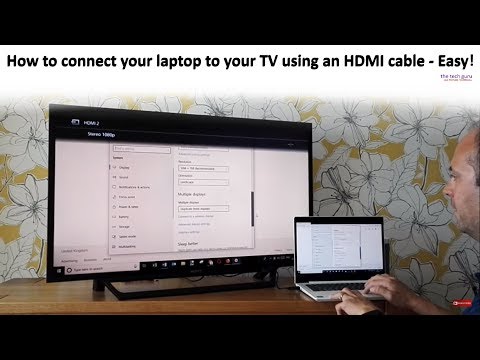
How to connect your laptop to your TV using an HDMI cable - Easy
ChannelThe Tech GuruDescription from the creator
In this video I will teach you how to connect your laptop to your TV using an HDMi cable. A Lenovo Windows laptop and Sony Bravia HDMI TV were used in this video.
It's a straightforward process as the video / tutorial demonstrates. Just follow these steps. Steps 1-3 cover setting up/turning on your equipment. Steps 4-7 cover the different output options when using an HDMi cable.
1. (00:50) Ensure that the HDMi cable is plugged into your TV, remembering which port the cable is connected e.g. HDMI1 / HDMI2 etc.
2. (1:01) Turn the TV on, going to the correct HDMI input.
3. (1:18) Turn the laptop on, plugging the HDMI cable into the laptop when ready.
Go to the display settings on your laptop - getting to these settings will vary by computer. If you have a search bar towards the bottom of your screen, type in the word display settings, or it may be that you can go through the notifications panel. Alternatively, you can go the control panel and look for appearance and personalisation settings.
Regards how to connect a computer/laptop to a TV, when presented with the display setting options, you can choose output for the following:
4: (2:42) Display on laptop/computer screen only.
5: (3:46) Duplicate the displays i.e whatever is on the laptop/computer screen will also show on your TV screen.
6. (4.25) Output the display to your TV only.
7. (6:36) Extend the displays from your laptop/computer to TV so you will be able to run two different programs requiring two different screens, e.g a website on the laptop/computer and excel spreadsheet on the TV.
Many thanks for watching our video on how to connect your laptop to your TV using an HDMI cable.
It's a straightforward process as the video / tutorial demonstrates. Just follow these steps. Steps 1-3 cover setting up/turning on your equipment. Steps 4-7 cover the different output options when using an HDMi cable.
1. (00:50) Ensure that the HDMi cable is plugged into your TV, remembering which port the cable is connected e.g. HDMI1 / HDMI2 etc.
2. (1:01) Turn the TV on, going to the correct HDMI input.
3. (1:18) Turn the laptop on, plugging the HDMI cable into the laptop when ready.
Go to the display settings on your laptop - getting to these settings will vary by computer. If you have a search bar towards the bottom of your screen, type in the word display settings, or it may be that you can go through the notifications panel. Alternatively, you can go the control panel and look for appearance and personalisation settings.
Regards how to connect a computer/laptop to a TV, when presented with the display setting options, you can choose output for the following:
4: (2:42) Display on laptop/computer screen only.
5: (3:46) Duplicate the displays i.e whatever is on the laptop/computer screen will also show on your TV screen.
6. (4.25) Output the display to your TV only.
7. (6:36) Extend the displays from your laptop/computer to TV so you will be able to run two different programs requiring two different screens, e.g a website on the laptop/computer and excel spreadsheet on the TV.
Many thanks for watching our video on how to connect your laptop to your TV using an HDMI cable.
About this tutorial
The Tech Guru published this 7:58 video tutorial on November 2, 2018. It has been watched 1,174,657 times on YouTube.
- Channel
- The Tech Guru
- Category
- Education
- Duration
- 7:58
- Published
- November 2, 2018
- Views
- 1,174,657
- Likes
- 7,210
Tags
Share
This tutorial in other languages
- FRComment connecter votre ordinateur portable à votre téléviseur à l'aide d'un câble HDMI - Facile
- ESCómo conectar su ordenador portátil al televisor mediante un cable HDMI - Fácil
- PTComo conectar seu laptop à sua TV usando um cabo HDMI - Fácil
- ITCome collegare il portatile al televisore utilizzando un cavo HDMI - Facile
- DEWie Sie Ihren Laptop an den Fernseher mit einem HDMI-Kabel anschließen - Easy
- NLHoe kunt u uw laptop aan te sluiten op uw TV via een HDMI-kabel - Gemakkelijk
- RUКак подключить ноутбук к телевизору с помощью кабеля HDMI - Easy
- PLJak podłączyć laptopa do telewizora za pomocą kabla HDMI - łatwa
- JAHDMIケーブルを使ってテレビにノートパソコンを接続する方法 - 簡単
- ARكيفية توصيل الكمبيوتر المحمول إلى جهاز التلفزيون باستخدام كابل HDMI - سهولة
- HIअपने टीवी एक HDMI केबल का उपयोग करने के लिए अपने लैपटॉप कनेक्ट करने के लिए कैसे - आराम
- IDCara menghubungkan laptop ke TV menggunakan kabel HDMI - Mudah