Playback starts YouTube’s embedded player (privacy-enhanced mode).
How to Fix : File Is Too Large For The Destination File System
ChannelTechno MathDescription from the creator
bit.ly/3jZ6sq8
How to Fix : File Is Too Large For The Destination File System
BackGround Music Used :
Source : YouTube Audio Library
1) Initial Intro : Eyes on You (Sting)
Category : POP
Mood : Happy
2) Alternate
Category : Dance & Electronics
Mood : Bright
Many times we encouter with the situation when we are trying to copy something into the USB hard drive or Pen Drive and you get this error in Windows 7, Windows 8 or Windows 10.
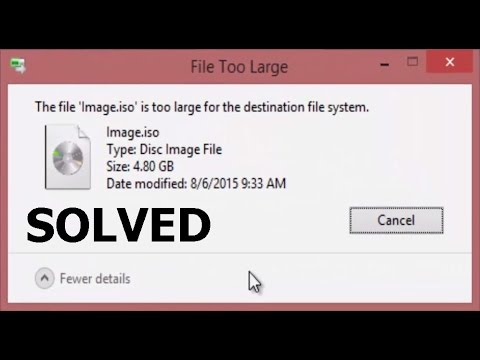
The file "FileName" is too large for the destination file system.
Here I have this 8 GB USB Stick with some data available in it. And When i am trying to copy this file which is in size of 4.80GB to my USB Stick, which still contains "5.15GB" free space. I get this error.!
The file size which I am trying to copy is of 4.11GB and the free space available on my USB Stick is more than that. So i should be able to copy this file into my USB Stick. Still it says that the file is too large for the destination file system.
So let me tell you friends, you may encounter this issue due to the fact that, your USB disk was previously formatted with FAT32 sile system, which allows you to copy the files only upto 4GB in size. And our file size is 4.11GB.
You can see the file system of your USB Disk by going into the Properties here.
So to overcome this issue, we need to convert the file system on our USB to NTFS from FAT32. There are two ways. Directly format the drive selecting NTFS from the dropdown here, which will erase all your data from USB, Or convert the file system from FAT32 to NTFS without loosing the data through Command Line.
So lets see the second option.
Go to the Start and Type CMD.
Right click on it and open with "Run As Administrator".
Now note down the Drive latter for your USB. Which is L, and then type this simple command in Command Prompt.
"Convert L : /fs:ntfs /nosecurity".
Hit Enter. Once you type Y and hit enter, cmd will start the file system conversion on your USB and after some time it will show the "Conversion complete"
Now if you go to the properties and check the file system, it will show you "NTFS" leaving all your data available on USB intact.
I would recommend to use this method instead of directly formatting the drive with NTFS file system unless there are some data available on your USB.
Now after conversion of file system, if I try to copy the same file from my desktop to the USB, it will easily gets copied.
Intro Music: Eyes On You (Sting)
Others : Alternate
How to Fix : File Is Too Large For The Destination File System
BackGround Music Used :
Source : YouTube Audio Library
1) Initial Intro : Eyes on You (Sting)
Category : POP
Mood : Happy
2) Alternate
Category : Dance & Electronics
Mood : Bright
Many times we encouter with the situation when we are trying to copy something into the USB hard drive or Pen Drive and you get this error in Windows 7, Windows 8 or Windows 10.
The file "FileName" is too large for the destination file system.
Here I have this 8 GB USB Stick with some data available in it. And When i am trying to copy this file which is in size of 4.80GB to my USB Stick, which still contains "5.15GB" free space. I get this error.!
The file size which I am trying to copy is of 4.11GB and the free space available on my USB Stick is more than that. So i should be able to copy this file into my USB Stick. Still it says that the file is too large for the destination file system.
So let me tell you friends, you may encounter this issue due to the fact that, your USB disk was previously formatted with FAT32 sile system, which allows you to copy the files only upto 4GB in size. And our file size is 4.11GB.
You can see the file system of your USB Disk by going into the Properties here.
So to overcome this issue, we need to convert the file system on our USB to NTFS from FAT32. There are two ways. Directly format the drive selecting NTFS from the dropdown here, which will erase all your data from USB, Or convert the file system from FAT32 to NTFS without loosing the data through Command Line.
So lets see the second option.
Go to the Start and Type CMD.
Right click on it and open with "Run As Administrator".
Now note down the Drive latter for your USB. Which is L, and then type this simple command in Command Prompt.
"Convert L : /fs:ntfs /nosecurity".
Hit Enter. Once you type Y and hit enter, cmd will start the file system conversion on your USB and after some time it will show the "Conversion complete"
Now if you go to the properties and check the file system, it will show you "NTFS" leaving all your data available on USB intact.
I would recommend to use this method instead of directly formatting the drive with NTFS file system unless there are some data available on your USB.
Now after conversion of file system, if I try to copy the same file from my desktop to the USB, it will easily gets copied.
Intro Music: Eyes On You (Sting)
Others : Alternate
About this tutorial
Techno Math published this 4:24 video tutorial on November 1, 2016. It has been watched 1,509,107 times on YouTube.
- Channel
- Techno Math
- Category
- Education
- Duration
- 4:24
- Published
- November 1, 2016
- Views
- 1,509,107
- Likes
- 27,539
Tags
Share
This tutorial in other languages
- FRComment réparer: fichier est trop volumineux pour la destination du système de fichiers
- ESCómo arreglar: archivo es demasiado grande para el sistema de archivos de destino
- PTComo corrigir: arquivo é muito grande para o sistema de arquivo de destino
- ITCome risolvere: file è troppo grande per il file system di destinazione
- DEWie Fix: Die Datei ist zu groß für das Zieldateisystem
- NLHoe te Fix: bestand te groot is voor de bestemming File System
- RUКак исправить: Файл слишком велик для Destination File System
- PLJak naprawić: Plik jest zbyt duży dla systemu Destination pliku
- JA修正する方法:ファイルを宛先ファイルシステムに対して大きすぎます
- ARكيفية إصلاح: ملف كبير جدا بالنسبة لنظام الوجهة الملف
- HIको कैसे सुधारें: फ़ाइल गंतव्य फाइल सिस्टम के लिए बहुत बड़ा है
- IDCara Memperbaiki: Berkas Apakah Terlalu Besar Untuk tujuan File System