Playback starts YouTube’s embedded player (privacy-enhanced mode).
How to FIX : Your PC Ran Into a Problem and Needs to Restart | INACCESSIBLE_BOOT_DEVICE
ChannelTechno MathIn brief
If your PC keeps restarting with the INACCESSIBLE_BOOT_DEVICE error and won’t let you log in, this video shows how to use the built-in Command Prompt in Advanced Options to restore corrupted registry files from a backup. It’s aimed at users stuck in an automatic repair loop due to registry changes, hardware tweaks, or improper shutdowns.
Key steps
- Force-restart your PC to trigger the Automatic Repair screen.
- Select Troubleshoot > Advanced Options > Command Prompt.
- Copy the five registry files (Default, SAM, Security, Software, System) from C:\Windows\System32\Config\RegBack to C:\Windows\System32\Config, overwriting existing files.
- Restart your PC to test if the error is resolved.
Description from the creator
Download Windows Boot Genius (bit.ly/2CC8eYx) to boot up Windows computer from various scenarios, such as black screen, blue screen, frozen, etc.
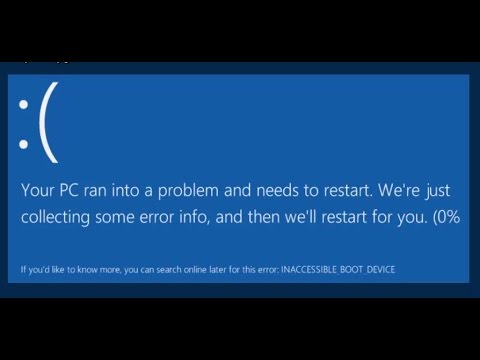
FIX : Your PC Ran Into a Problem and Needs to Restart. We're just collecting some error info, and then we'll restart for you. (0%)
If you'd like to know more, you can search online later for this error: INACCESSIBLE_BOOT_DEVICE
Many times the following error "Your PC Ran into a problem and needs to restart. We're just collecting some error info, and then we'll restart for you." makes a lot of trouble for you and it does not even let you login. It automatically goes into the infinite restart loop mode. So here is the solution.
Eventually this error message stands for a very short time. So when you start your system, this error pops up like for a second and then suddenly restarts the system.
So after the error pop up, immediately system restarts and then starts this "Automatic Repair". After sometime it starts "Diagnosing your PC" and finally when it finds out there is nothing to do more, comes up with these tow options "Restart and Advanced Option".
So Before going into the Advanced option for resolving this issue, let me tell you why this situation comes.?
There are multiple reasons which includes,
1) Changes in registry
2) Recent changes in Hardware of the system.
3) Any recent driver insatllation which went wrong.
4) Improper shutdown of the system which includes forcefull shutdown.
Once you go to the "Automatic Repair" screen and Restart the system, it comes with the same error and end up there again only. So Go to the "Advanced Option".
Select the "Troubleshoot" option. Here there are multiple options "Refresh your PC", "Reset your PC", "Microsoft Diagnostics and Recovery toolset" and "Advanced Options". Click on "Advanced Options" as the other options are not going to help you.
Under the "Advanced options" there are again multiple options. "System Restore" which is help full only if you have created a Restore Point. "System Image Recovery" is help full only if the Image Recovery is created. Both these options are not going to help me here as i didnt created both. We already did "Startup Repair" and "Startup Settings" contains different options.
So click on fourth option "Command Prompt" and from here we are going to restore the registry to the previous state prior to the changes.
Go to following Location "C:\Windows\System32\Config\RegBack" and copy all the following files "Default", "SAM", "Security", "Software" and "System" to the previous directory that is "C"\Windows\System32\Config". Before copying these files to the Config folder, please take the back from Config folder.
Once you restore the registry files, restart your system. And magically your system will start again normally.
If you like the video, keep sharing the video and subscribe to the channel to get the future updates.
Audio Tracks Used :
1. Follow Me
2. Dance Monster - Electronic Medium by Kevin MacLeod is licensed under a Creative Commons Attribution license (creativecommons.org/licenses/by/4.0/)
Source: incompetech.com/music/royalty-free/index.html?i…
Artist: incompetech.com/
3. Hot Heat
4. Bomber (Sting)
FIX : Your PC Ran Into a Problem and Needs to Restart. We're just collecting some error info, and then we'll restart for you. (0%)
If you'd like to know more, you can search online later for this error: INACCESSIBLE_BOOT_DEVICE
Many times the following error "Your PC Ran into a problem and needs to restart. We're just collecting some error info, and then we'll restart for you." makes a lot of trouble for you and it does not even let you login. It automatically goes into the infinite restart loop mode. So here is the solution.
Eventually this error message stands for a very short time. So when you start your system, this error pops up like for a second and then suddenly restarts the system.
So after the error pop up, immediately system restarts and then starts this "Automatic Repair". After sometime it starts "Diagnosing your PC" and finally when it finds out there is nothing to do more, comes up with these tow options "Restart and Advanced Option".
So Before going into the Advanced option for resolving this issue, let me tell you why this situation comes.?
There are multiple reasons which includes,
1) Changes in registry
2) Recent changes in Hardware of the system.
3) Any recent driver insatllation which went wrong.
4) Improper shutdown of the system which includes forcefull shutdown.
Once you go to the "Automatic Repair" screen and Restart the system, it comes with the same error and end up there again only. So Go to the "Advanced Option".
Select the "Troubleshoot" option. Here there are multiple options "Refresh your PC", "Reset your PC", "Microsoft Diagnostics and Recovery toolset" and "Advanced Options". Click on "Advanced Options" as the other options are not going to help you.
Under the "Advanced options" there are again multiple options. "System Restore" which is help full only if you have created a Restore Point. "System Image Recovery" is help full only if the Image Recovery is created. Both these options are not going to help me here as i didnt created both. We already did "Startup Repair" and "Startup Settings" contains different options.
So click on fourth option "Command Prompt" and from here we are going to restore the registry to the previous state prior to the changes.
Go to following Location "C:\Windows\System32\Config\RegBack" and copy all the following files "Default", "SAM", "Security", "Software" and "System" to the previous directory that is "C"\Windows\System32\Config". Before copying these files to the Config folder, please take the back from Config folder.
Once you restore the registry files, restart your system. And magically your system will start again normally.
If you like the video, keep sharing the video and subscribe to the channel to get the future updates.
Audio Tracks Used :
1. Follow Me
2. Dance Monster - Electronic Medium by Kevin MacLeod is licensed under a Creative Commons Attribution license (creativecommons.org/licenses/by/4.0/)
Source: incompetech.com/music/royalty-free/index.html?i…
Artist: incompetech.com/
3. Hot Heat
4. Bomber (Sting)
About this tutorial
Techno Math published this 7:41 video tutorial on October 31, 2016. It has been watched 9,319,251 times on YouTube.
- Channel
- Techno Math
- Category
- Science & Technology
- Duration
- 7:41
- Published
- October 31, 2016
- Views
- 9,319,251
- Likes
- 55,267
Tags
Share
This tutorial in other languages
- FRComment CORRECTIF: votre PC Ran un problème et doit redémarrer | INACCESSIBLE_BOOT_DEVICE
- ESCómo REVISIÓN: El PC se topó con un problema y debe reiniciar | INACCESSIBLE_BOOT_DEVICE
- PTComo corrigir: Seu PC deparou com um problema e precisa ser Restart | INACCESSIBLE_BOOT_DEVICE
- ITCome FIX: Il tuo PC sono imbattuto in un problema e deve riavviare | INACCESSIBLE_BOOT_DEVICE
- DEWie man UPDATE: Ihr PC läuft in einem Problem und muss neu starten | INACCESSIBLE_BOOT_DEVICE
- NLHow To Fix Uw PC liep in een probleem en moet opnieuw worden opgestart | INACCESSIBLE_BOOT_DEVICE
- RUКак FIX: Ваш ПК столкнулся с проблемой и требует перезапуска | INACCESSIBLE_BOOT_DEVICE
- PLJak naprawić: Ran Twój komputer w problem i musi zostać Restart | INACCESSIBLE_BOOT_DEVICE
- JAどのように修正するには:問題と再起動が必要にあなたのPCの蘭| INACCESSIBLE_BOOT_DEVICE
- ARكيفية FIX: PC ران الخاص بك إلى مشكلة ويجب إعادة تشغيل | INACCESSIBLE_BOOT_DEVICE
- HIठीक कैसे करें: एक समस्या और पुनः प्रारंभ करना होगा में अपने पीसी दौड़ा | INACCESSIBLE_BOOT_DEVICE
- IDCara FIX: Ran PC Anda Ke Masalah dan Kebutuhan untuk Restart | INACCESSIBLE_BOOT_DEVICE