Playback starts YouTube’s embedded player (privacy-enhanced mode).
How to Check and Set the TimeZone on Ubuntu 18.04 LTS?
ChannelTechMeSpotDescription from the creator
How to Check and Set the TimeZone on Ubuntu 18.04 LTS?
Via Terminal:
First, right click on the desktop, and then click on 'open terminal.' After that, run the commands below and follow the video.
i) To Check TimeZone
timedatectl
ii) To Set TimeZone:
sudo timedatectl set-timezone your_timezone
or
sudo dpkg-reconfigure tzdata
Via GUI
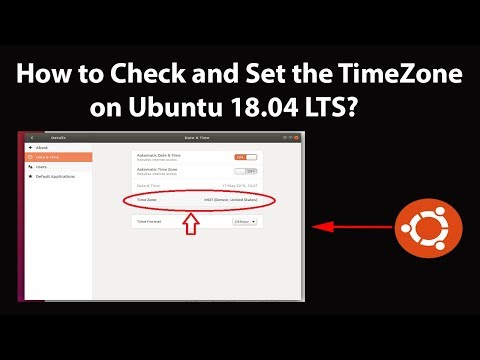
Step 1: Click on Panel at the top right.
Step 2: Click on Settings, and then click on 'Details' in settings window.
Step 3: Click on 'Date & Time.'
Step 4: Click on 'Time Zone,' and then click on Time Zone from the map. After that, close the window. you will see your time zone is changed. You can close the settings window.
Thanks for watching, please like and subscribe
==============================================
YouTube Subscribe: goo.gl/4lCCN8
Patreon: patreon.com/TechMeSpot
Facebook: facebook.com/techmespot
Twitter: twitter.com/techmespot
Website: techmespot.com
#howto #TimeZone #UbuntuTips
Via Terminal:
First, right click on the desktop, and then click on 'open terminal.' After that, run the commands below and follow the video.
i) To Check TimeZone
timedatectl
ii) To Set TimeZone:
sudo timedatectl set-timezone your_timezone
or
sudo dpkg-reconfigure tzdata
Via GUI
Step 1: Click on Panel at the top right.
Step 2: Click on Settings, and then click on 'Details' in settings window.
Step 3: Click on 'Date & Time.'
Step 4: Click on 'Time Zone,' and then click on Time Zone from the map. After that, close the window. you will see your time zone is changed. You can close the settings window.
Thanks for watching, please like and subscribe
==============================================
YouTube Subscribe: goo.gl/4lCCN8
Patreon: patreon.com/TechMeSpot
Facebook: facebook.com/techmespot
Twitter: twitter.com/techmespot
Website: techmespot.com
#howto #TimeZone #UbuntuTips
About this tutorial
TechMeSpot published this 7:01 video tutorial on November 10, 2019. It has been watched 4,386 times on YouTube.
- Channel
- TechMeSpot
- Category
- Howto & Style
- Duration
- 7:01
- Published
- November 10, 2019
- Views
- 4,386
- Likes
- 22
Tags
Share
This tutorial in other languages
- FRComment vérifier et définir le décalage horaire sur Ubuntu 18.04 LTS?
- ESCómo comprobar y establecer la zona horaria en Ubuntu 18.04 LTS?
- PTComo verificar e definir o fuso horário no Ubuntu 18.04 LTS?
- ITCome controllare e impostare il fuso orario su Ubuntu 18.04 LTS?
- DESo kontrolliert und die Time-Zone auf Ubuntu 18.04 LTS Set?
- NLHoe te controleren en zet de TimeZone op Ubuntu 18.04 LTS?
- RUКак проверить и установить TimeZone на Ubuntu 18.04 LTS?
- PLJak sprawdzić i ustawić strefę czasową na Ubuntu 18.04 LTS?
- JAどのようにチェックして、Ubuntuの18.04 LTSにタイムゾーンを設定するには?
- ARكيفية فحص وتعيين والوقت على أوبونتو 18.04 LTS؟
- HIकैसे चेक करें और उबंटू 18.04 LTS पर समय क्षेत्र सेट करने के लिए?
- IDBagaimana Periksa dan Set TimeZone pada Ubuntu 18.04 LTS?