Playback starts YouTube’s embedded player (privacy-enhanced mode).
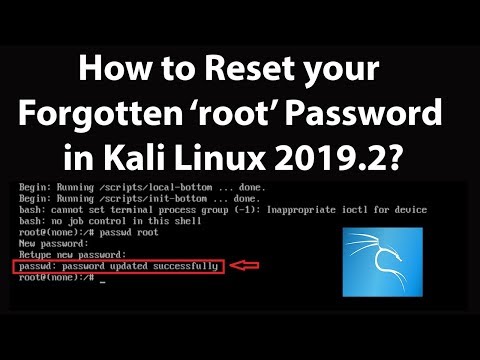
How to Reset your Forgotten Root Password in Kali Linux 2019.2?
ChannelTechMeSpotDescription from the creator
How to Reset your Forgotten Root Password in Kali Linux 2019.2?
Step 1: Restart your Kali Linux, and when your computer boots up to Grub menu, use your downward arrow key to highlight 'Advanced Options for Kali/GNU linux', and then hit Enter key on the keyboard.
Step 2: Highlight 'Recovery Mode', and then Press 'e' key on the keyboard.
Step 3: Now, On the Next Screen, Go to line linux and replace 'ro' with 'rw'. Also, go to the end of the line linux and then hit space key, and then type init=/bin/bash. Press 'f10' key (if you are using laptop, press fn + f10 key) on the keyboard.
Step 4: Type command below to change password
passwd root
and then hit enter. Type your password, and then hit Enter. Again, Re-type the password, and hit Enter. you will see the message, password updated successfully.
Step 5: Now, use the command below to reboot kali linux.
reboot -f
and then, hit Enter.
Step 6: Let kali linux restart normally, and when you see login screen, enter new password. You will be able to login with that.
It's done
My Recommended Products & Gears for Youtubers, and others (Affiliate Link):-
amazon.in/shop/techmespot
Thanks for watching, Don't forget to subscribe for more tech videos.
========================================================
YouTube Subscribe: goo.gl/4lCCN8
Twitter: twitter.com/techmespot
Website: techmespot.com
#howto #ResetForgottenRootPasswordInKaliLinux #KaliLinuxTutorials
Disclaimer :- Techmespot is a participant in the Amazon Services LLC Associates Program, an affiliate advertising program designed to provide a means for sites to earn advertising fees by advertising and linking to www.amazon.in. Thank you for supporting Techmespot so I can continue to provide you with free content.
Step 1: Restart your Kali Linux, and when your computer boots up to Grub menu, use your downward arrow key to highlight 'Advanced Options for Kali/GNU linux', and then hit Enter key on the keyboard.
Step 2: Highlight 'Recovery Mode', and then Press 'e' key on the keyboard.
Step 3: Now, On the Next Screen, Go to line linux and replace 'ro' with 'rw'. Also, go to the end of the line linux and then hit space key, and then type init=/bin/bash. Press 'f10' key (if you are using laptop, press fn + f10 key) on the keyboard.
Step 4: Type command below to change password
passwd root
and then hit enter. Type your password, and then hit Enter. Again, Re-type the password, and hit Enter. you will see the message, password updated successfully.
Step 5: Now, use the command below to reboot kali linux.
reboot -f
and then, hit Enter.
Step 6: Let kali linux restart normally, and when you see login screen, enter new password. You will be able to login with that.
It's done
My Recommended Products & Gears for Youtubers, and others (Affiliate Link):-
amazon.in/shop/techmespot
Thanks for watching, Don't forget to subscribe for more tech videos.
========================================================
YouTube Subscribe: goo.gl/4lCCN8
Twitter: twitter.com/techmespot
Website: techmespot.com
#howto #ResetForgottenRootPasswordInKaliLinux #KaliLinuxTutorials
Disclaimer :- Techmespot is a participant in the Amazon Services LLC Associates Program, an affiliate advertising program designed to provide a means for sites to earn advertising fees by advertising and linking to www.amazon.in. Thank you for supporting Techmespot so I can continue to provide you with free content.
About this tutorial
TechMeSpot published this 5:19 video tutorial on October 30, 2019. It has been watched 181,113 times on YouTube.
- Channel
- TechMeSpot
- Category
- Howto & Style
- Duration
- 5:19
- Published
- October 30, 2019
- Views
- 181,113
- Likes
- 2,891
Tags
Share
This tutorial in other languages
- FRComment réinitialiser votre mot de passe oublié racine dans Kali Linux 2019,2?
- ESCómo restablecer la contraseña de root Olvidado en Kali Linux 2019.2?
- PTComo redefinir sua senha de root esquecido em Kali Linux 2019,2?
- ITCome reimpostare la vostra password di root dimenticata in Kali Linux 2019,2?
- DEWie Sie Ihr Passwort Root-Passwort in Kali Linux 2.019,2 zurücksetzen?
- NLHoe kunt u uw vergeten Root Password Reset in Kali Linux 2019,2?
- RUКак Сбросить забытый пароль пользователя root в Kali Linux 2019.2?
- PLJak resetować zapomniane hasła roota w Kali Linux 2019.2?
- JAカーリーのLinux 2019.2であなたの忘れたルートパスワードをリセットする方法?
- ARكيفية إعادة تعيين الخاص بك هل نسيت كلمة المرور الجذر في كالي لينكس 2019.2؟
- HIकैसे काली लिनक्स 2019.2 में अपनी भूल रूट पासवर्ड रीसेट करने के लिए?
- IDCara Reset Anda Lupa Password Root di Kali Linux 2019,2?