Playback starts YouTube’s embedded player (privacy-enhanced mode).
How to Search by File Extension, Date and Size in Windows
ChannelBest Video Tutorials and Help from HowTechDescription from the creator
Don't forget to check out our site howtech.tv/ for more free how-to videos!
youtube.com/ithowtovids - our feed
facebook.com/howtechtv - join us on facebook
plus.google.com/103440382717658277879 - our group in Google+
This tutorial will show you some special tricks of using Windows Search which should make it easier for you to find certain document on your computer.
Step # 1 -- Opening the Search Window
To open the search window you will need to press the "Windows button" and "F" on your keyboard. You can also use any of the search boxes that appear in the upper right of Windows Explorer windows.
Step # 2 -- Searching by File Type
First, let's have a look at how to search for a specific file type using search. Into the search box type "ext:" then enter the file extension of the document. Here we are going to search for PowerPoint files, which have the extention "pptx" so we will type this. Below all the files on the computer that are of this type will appear. To refine the search further enter a space and then type a word that would be found in the document here we are typing "test" and you can see the results below are filtered down further.
Step # 3 -- Searching by Date
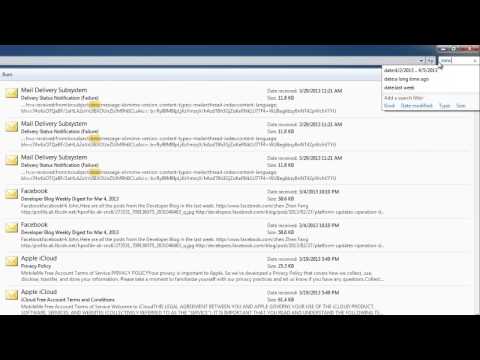
To search for files that have been used in a certain time frame type into the search box "date:". A menu will open allowing you to select various options, you can either select a specific day in the calendar, or click and drag to select a range. There are also several preset option below to choose from. Here we will search for files that were edit last week and as you can see they appear in the results box.
Step # 4 -- Searching by Size
You can also search for files by size. In the search box type "size:" and a menu will appear below, from this select the size of the file that you are looking for. Here we are selecting "medium" and files of this size will populate in the window.
Step # 5 -- Combining Search Filters
Now that you know some of the common search filters, it is also worth knowing how to combine them. For example if you want to search for a PowerPoint file that is of a medium size. Into the search box type "ext:pptx size:medium" and all files that meet both of these criteria will be displayed. These are just a few of the special tricks of using Windows Search.
About this tutorial
Best Video Tutorials and Help from HowTech published this 2:07 video tutorial on October 25, 2013. It has been watched 187,322 times on YouTube.
- Category
- Howto & Style
- Duration
- 2:07
- Published
- October 25, 2013
- Views
- 187,322
- Likes
- 603
Tags
Share
Further reading
-
How to Search for Files from a Certain Date Range in Windows ...
howtogeek.com
Searching a specific date range in Windows 8 and 10 is harder than it needs to be. Back in the days of Windows XP, File Explorer presented a calendar selector front and center. Even in Windows Vista and Windows 7, that…
-
Windows Tip: How To Search Large Files using File Explorer or ...
nextofwindows.com
Search files by size in File Explorer on Windows 10. Because of the ribbon introduced in Windows 10, there are a number of new options added in Search ribbon when the Search box in File Explorer is selected. Open File E…
-
Windows 10 tip: Search for any file by date | ZDNet
zdnet.com
Windows 10 tip: Search for any file by date. Finding the right file can be frustrating, especially if you have a large number of files in multiple subfolders.
This tutorial in other languages
- FRComment rechercher par extension de fichier, date et taille dans Windows
- ESCómo buscar por extensión de archivo, fecha y el tamaño en Windows
- PTComo pesquisar por File Extension, data e tamanho no Windows
- ITCome alla ricerca per file di estensione, data e dimensione in Windows
- DEWie durch Dateierweiterung, Datum und Größe in Windows suchen
- NLHoe kan ik zoeken op File Extension, datum en grootte in Windows
- RUКак Поиск по File Extension, дата и размер в ОС Windows
- PLJak szukać przez rozszerzenie pliku, daty i rozmiaru w Windows
- JAWindowsのファイル拡張子、日付やサイズによって検索する方法
- ARكيفية البحث عن طريق ملف التمديد، التاريخ والحجم في ويندوز
- HIकैसे द्वारा फ़ाइल एक्सटेंशन, दिनांक और Windows में आकार खोज करने के लिए
- IDCara Cari dengan Extension File, Tanggal dan Ukuran pada Windows