Playback starts YouTube’s embedded player (privacy-enhanced mode).
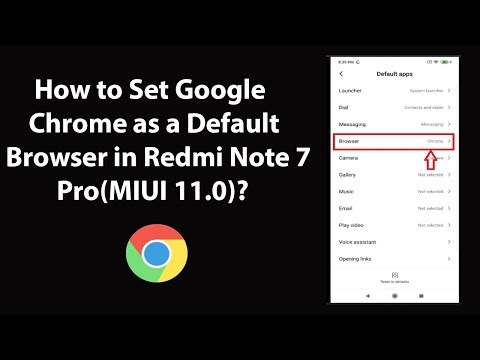
How to Set Google Chrome as a Default Browser in Redmi Note 7 Pro(MIUI 11.0)?
ChannelTechMeSpotDescription from the creator
How to Set Google Chrome as a Default Browser in Redmi Note 7 Pro(MIUI 11.0)?
Note: First go to Play Store and Download and Install Google Chrome App, If you have not done it yet. After that, follow the instructions below:-
Step 1: Open 'Settings' App.
Step 2: Scroll down to 'Apps,' and then tap on it.
Step 3: Tap on 'Manage Apps.'
Step 4: Tap on 'Three Dots' at the top right, and then tap on 'Default Apps.'
Step 5: Tap on 'Browser,' and then tap on 'Chrome.'
It's done.
My Recommended Products & Gears for Youtubers, and others (Affiliate Link):-
amazon.in/shop/techmespot
Thanks for watching, Don't forget to subscribe for more tech videos.
=======================================================
YouTube Subscribe: goo.gl/4lCCN8
Twitter: twitter.com/techmespot
Website: techmespot.com
#howto #GoogleChrome #RedmiNote7Pro
Disclaimer :- Techmespot is a participant in the Amazon Services LLC Associates Program, an affiliate advertising program designed to provide a means for sites to earn advertising fees by advertising and linking to www.amazon.in. Thank you for supporting Techmespot so I can continue to provide you with free content.
Note: First go to Play Store and Download and Install Google Chrome App, If you have not done it yet. After that, follow the instructions below:-
Step 1: Open 'Settings' App.
Step 2: Scroll down to 'Apps,' and then tap on it.
Step 3: Tap on 'Manage Apps.'
Step 4: Tap on 'Three Dots' at the top right, and then tap on 'Default Apps.'
Step 5: Tap on 'Browser,' and then tap on 'Chrome.'
It's done.
My Recommended Products & Gears for Youtubers, and others (Affiliate Link):-
amazon.in/shop/techmespot
Thanks for watching, Don't forget to subscribe for more tech videos.
=======================================================
YouTube Subscribe: goo.gl/4lCCN8
Twitter: twitter.com/techmespot
Website: techmespot.com
#howto #GoogleChrome #RedmiNote7Pro
Disclaimer :- Techmespot is a participant in the Amazon Services LLC Associates Program, an affiliate advertising program designed to provide a means for sites to earn advertising fees by advertising and linking to www.amazon.in. Thank you for supporting Techmespot so I can continue to provide you with free content.
About this tutorial
TechMeSpot published this 4:34 video tutorial on November 26, 2019. It has been watched 212,474 times on YouTube.
- Channel
- TechMeSpot
- Category
- Howto & Style
- Duration
- 4:34
- Published
- November 26, 2019
- Views
- 212,474
- Likes
- 3,898
Tags
Share
This tutorial in other languages
- FRComment configurer Google Chrome comme navigateur par défaut dans redmi Note 7 Pro (MIUI 11.0)?
- ESCómo establecer Google Chrome como navegador predeterminado en redmi Nota 7 Pro (MIUI 11.0)?
- PTComo definir o Google Chrome como navegador padrão no redmi Nota 7 Pro (MIUI 11,0)?
- ITCome impostare Google Chrome come browser predefinito in redmi nota 7 Pro (MIUI 11.0)?
- DEWie man Google Chrome als Standardbrowser in Redmi Anmerkung 7 Pro (MIUI 11,0)?
- NLHoe stel ik Google Chrome als standaardbrowser in redmi Note 7 Pro (MIUI 11.0)?
- RUКак установить Google Chrome в качестве браузера по умолчанию в реом Примечании 7 Pro (MIUI 11,0)?
- PLJak ustawić Google Chrome jako domyślną przeglądarkę w redmi nocie 7 Pro (MIUI 11,0)?
- JAどのようにRedmi注7 Proは(MIUI 11.0)でデフォルトのブラウザとして設定Google Chromeのか?
- ARكيفية تعيين Google Chrome متصفح افتراضي في Redmi ملاحظة 7 برو (MIUI 11.0)؟
- HIकैसे सेट गूगल क्रोम के लिए रेडमी नोट 7 प्रो (MIUI 11.0) में एक डिफ़ॉल्ट ब्राउज़र के रूप?
- IDCara Set Google Chrome sebagai Browser default di redmi Catatan 7 Pro (MIUI 11.0)?