Playback starts YouTube’s embedded player (privacy-enhanced mode).
How to Setup Skype on iPad and iPhone
ChanneliPhone, iPad and Android Tutorials from HowTechDescription from the creator
In this tutorial you are going to learn how to setup Skype on an iPad which can be a great way to make affordable calls from the device.
Don't forget to check out our site howtech.tv/ for more free how-to videos!
youtube.com/ithowtovids - our feed
Facebook.com/howtechtv - join us on Facebook
plus.google.com/103440382717658277879 - our group in Google+
Step # 1 -- Getting the App
Before you start with the app on the device you are going to need to install it from the App Store. You can easily find it in the store by searching for Skype, the app you are interested in is called "Skype for iPad". Install this just as you would any other app. As you can see here it is already installed, so we just need to touch the "Open" button.
Step # 2 -- Creating an Account
Assuming this will be the first time you have opened the app you will be prompter to log in. If you have Skype credentials already you will need to log in with these, but if you do not you will need to touch the "New to Skype?" option at the bottom. Touch "I agree" on the next page. You will then be able to enter details of the account that you are creating, go through these and when you are done touch "Create Account".
Step # 3 -- Logging in and Making a Call
After a moment of loading the account will be created and you will sign in. A popup might appear informing you about Skype and how it can be used to make free calls, simply touch "Done". You will now be in Skype and you are able to add contacts to talk to by touching the "plus" button at the top right of the program. For now, let's make a quick test call to make sure that it works.
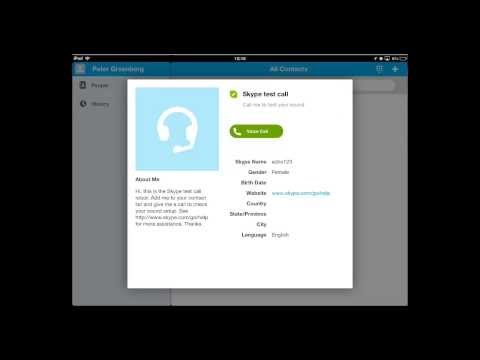
Touch "Skype Test Call" and a window will appear, click "Voice Call" and the number will be dialed, touch the red button when you are done with the call and you now know how to setup Skype on an iPad.
Don't forget to check out our site howtech.tv/ for more free how-to videos!
youtube.com/ithowtovids - our feed
Facebook.com/howtechtv - join us on Facebook
plus.google.com/103440382717658277879 - our group in Google+
Step # 1 -- Getting the App
Before you start with the app on the device you are going to need to install it from the App Store. You can easily find it in the store by searching for Skype, the app you are interested in is called "Skype for iPad". Install this just as you would any other app. As you can see here it is already installed, so we just need to touch the "Open" button.
Step # 2 -- Creating an Account
Assuming this will be the first time you have opened the app you will be prompter to log in. If you have Skype credentials already you will need to log in with these, but if you do not you will need to touch the "New to Skype?" option at the bottom. Touch "I agree" on the next page. You will then be able to enter details of the account that you are creating, go through these and when you are done touch "Create Account".
Step # 3 -- Logging in and Making a Call
After a moment of loading the account will be created and you will sign in. A popup might appear informing you about Skype and how it can be used to make free calls, simply touch "Done". You will now be in Skype and you are able to add contacts to talk to by touching the "plus" button at the top right of the program. For now, let's make a quick test call to make sure that it works.
Touch "Skype Test Call" and a window will appear, click "Voice Call" and the number will be dialed, touch the red button when you are done with the call and you now know how to setup Skype on an iPad.
About this tutorial
iPhone, iPad and Android Tutorials from HowTech published this 1:18 video tutorial on November 8, 2013. It has been watched 156,686 times on YouTube.
- Category
- Howto & Style
- Duration
- 1:18
- Published
- November 8, 2013
- Views
- 156,686
- Likes
- 158
Tags
Share
This tutorial in other languages
- FRComment Skype Setup sur iPad et iPhone
- ESCómo Skype Configuración en el iPad y el iPhone
- PTComo Skype Setup no iPad e iPhone
- ITCome Skype Setup su iPad e iPhone
- DEWie Setup Skype auf iPad und iPhone
- NLHoe je Skype op iPad en iPhone
- RUКак установить Skype на IPad и iPhone
- PLJak Skype Setup na iPad i iPhone
- JAどのようにiPadとiPhone上のセットアップのSkypeへ
- ARكيفية سكايب الإعداد على جهاز iPad و iPhone
- HIकैसे iPad और iPhone पर सेटअप स्काइप के लिए
- IDCara Setup Skype di iPad dan iPhone