Playback starts YouTube’s embedded player (privacy-enhanced mode).
How to Use Liquify in Photoshop CC
ChanneltutvidDescription from the creator
Check out another of my videos: "BREAKDOWN: Select and Mask vs. Refine Edge - Photoshop CC"
youtube.com/watch?v=DTw78XQNjAo
-~-~~-~~~-~~-~-
Pick up my image retouching tutorial package ($27) right here: bit.ly/support-tutvid
Find the written tutorial on the site: tutvid.com/photoshop-tutorials/how-to-use-liqui…
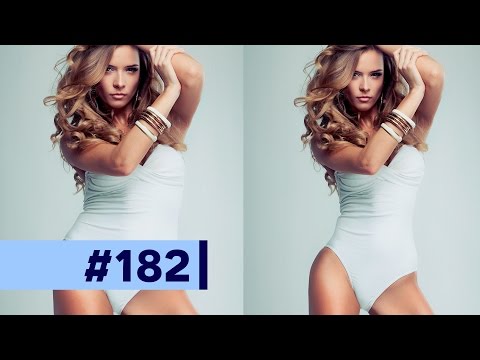
Well, you know it had to happen. Fat-shaming or not, we had to talk about making a girl thin in Photoshop using the Liquify filter. Ladies, I know you always want to look skinnier and this is the latest and greatest tutorial on losing 10, 20, or 50lbs in Photoshop fast! We will look at how I use Liquify to makes a girl’s eyes and lips larger and then how we work with a plus-sized model and reduce her to a typical-sized model using the smudging and puckering and masking tools in Liquify. You’re going to love this tutorial if you’re a portrait, fashion, or commercial photographer, or if you’re just looking to shed some pounds digitally in preparation for that dating profile.
VIDEO GUIDE:
1:16 Convert to Smart Object
1:32 Opening Liquify
1:57 Correcting the 16-bit image glowing box problem
2:59 Liquify to change her face
4:48 Weight loss with Liquify
5:24 Squeeze with transform
6:19 Liquify Mask Tool
7:31 Pucker Tool to being manipulating the body
7:59 Smudge Tool to adjust her figure
9:49 Adjusting smaller details
10:21 More of the Pucker Tool
11:14 Before/After Results
11:41 Adjusting Liquify
12:25 Real life example of Liquify mask tool usefulness
14:20 Outro
SNAPCHAT & MORE:
instagram.com/tutvid
twitter.com/tutvid
facebook.com/tutvid
👻 tutvid.com
youtube.com/watch?v=DTw78XQNjAo
-~-~~-~~~-~~-~-
Pick up my image retouching tutorial package ($27) right here: bit.ly/support-tutvid
Find the written tutorial on the site: tutvid.com/photoshop-tutorials/how-to-use-liqui…
Well, you know it had to happen. Fat-shaming or not, we had to talk about making a girl thin in Photoshop using the Liquify filter. Ladies, I know you always want to look skinnier and this is the latest and greatest tutorial on losing 10, 20, or 50lbs in Photoshop fast! We will look at how I use Liquify to makes a girl’s eyes and lips larger and then how we work with a plus-sized model and reduce her to a typical-sized model using the smudging and puckering and masking tools in Liquify. You’re going to love this tutorial if you’re a portrait, fashion, or commercial photographer, or if you’re just looking to shed some pounds digitally in preparation for that dating profile.
VIDEO GUIDE:
1:16 Convert to Smart Object
1:32 Opening Liquify
1:57 Correcting the 16-bit image glowing box problem
2:59 Liquify to change her face
4:48 Weight loss with Liquify
5:24 Squeeze with transform
6:19 Liquify Mask Tool
7:31 Pucker Tool to being manipulating the body
7:59 Smudge Tool to adjust her figure
9:49 Adjusting smaller details
10:21 More of the Pucker Tool
11:14 Before/After Results
11:41 Adjusting Liquify
12:25 Real life example of Liquify mask tool usefulness
14:20 Outro
SNAPCHAT & MORE:
instagram.com/tutvid
twitter.com/tutvid
facebook.com/tutvid
👻 tutvid.com
About this tutorial
tutvid published this 15:09 video tutorial on November 5, 2016. It has been watched 589,976 times on YouTube.
- Channel
- tutvid
- Category
- Howto & Style
- Duration
- 15:09
- Published
- November 5, 2016
- Views
- 589,976
- Likes
- 7,014
Tags
Share
This tutorial in other languages
- FRComment utiliser Fluidité dans Photoshop CC
- ESCómo utilizar Licuar en Photoshop CC
- PTComo usar Dissolver em Photoshop CC
- ITCome utilizzare Fluidifica in Photoshop CC
- DEWie zu verwenden Verflüssigen in Photoshop CC
- NLHoe te gebruiken Uitvloeien in Photoshop CC
- RUКак использовать Liquify в Photoshop CC
- PLJak korzystać Skraplanie w Photoshop CC
- JAどのようにPhotoshopのCCで使用ゆがみへ
- ARكيفية استخدام التسييل في فوتوشوب CC
- HIकैसे उपयोग करने के लिए Liquify फ़ोटोशॉप सीसी में
- IDCara Gunakan Liquify di Photoshop CC