Playback starts YouTube’s embedded player (privacy-enhanced mode).
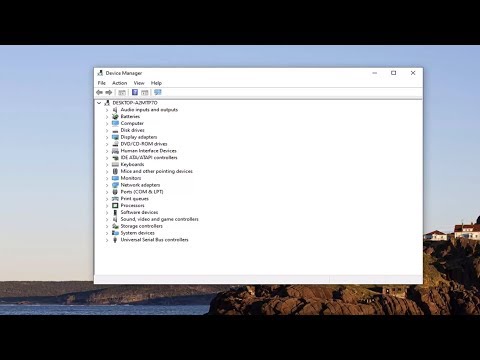
How to Check If Your Windows 10 PC Has In-Built Bluetooth
ChannelMDTechVideosDescription from the creator
How to Check If Your Windows 10 PC Has In-Built Bluetooth.
Bluetooth is a wireless technology protocol for connecting a PC with external peripherals and devices. It can be quite useful, and many PCs come with built-in Bluetooth support. It’s basically a protocol that enables you to connect a desktop or laptop with Bluetooth-enabled devices without any cables. Sometimes users might not be even aware that their device has Bluetooth.
Bluetooth is a wireless technology protocol for connecting a PC with external peripherals and devices.
So it’s basically a protocol that enables you to connect a desktop or laptop with Bluetooth devices without any cables.
Of course, you can still connect the devices with cables; but if your Windows 10 PC has Bluetooth support you can set up a wireless connection for them instead.
If you upgraded a Windows 7 laptop or desktop to Windows 10, it might not support Bluetooth; and this is how you can check if that’s the case.
This tutorial will apply for computers, laptops, desktops,and tablets running the Windows 10 operating system (Home, Professional, Enterprise, Education) from all supported hardware manufactures, like Dell, HP, Acer, Asus, Toshiba,Lenovo, and Samsung).
Bluetooth is a wireless technology protocol for connecting a PC with external peripherals and devices. It can be quite useful, and many PCs come with built-in Bluetooth support. It’s basically a protocol that enables you to connect a desktop or laptop with Bluetooth-enabled devices without any cables. Sometimes users might not be even aware that their device has Bluetooth.
Bluetooth is a wireless technology protocol for connecting a PC with external peripherals and devices.
So it’s basically a protocol that enables you to connect a desktop or laptop with Bluetooth devices without any cables.
Of course, you can still connect the devices with cables; but if your Windows 10 PC has Bluetooth support you can set up a wireless connection for them instead.
If you upgraded a Windows 7 laptop or desktop to Windows 10, it might not support Bluetooth; and this is how you can check if that’s the case.
This tutorial will apply for computers, laptops, desktops,and tablets running the Windows 10 operating system (Home, Professional, Enterprise, Education) from all supported hardware manufactures, like Dell, HP, Acer, Asus, Toshiba,Lenovo, and Samsung).
About this tutorial
MDTechVideos published this 0:59 video tutorial on February 10, 2020. It has been watched 10,191 times on YouTube.
- Channel
- MDTechVideos
- Category
- Science & Technology
- Duration
- 0:59
- Published
- February 10, 2020
- Views
- 10,191
- Likes
- 52
Tags
Share
This tutorial in other languages
- FRComment vérifier si votre Windows 10 PC a intégré In-Bluetooth
- ESCómo comprobar si se ha construido en su PC con Windows-10 Bluetooth
- PTComo verificar se o seu PC com Windows 10 tem embutido Bluetooth
- ITCome controllare se il vostro Windows 10 PC è in-built Bluetooth
- DESo prüfen Sie, ob Ihr Windows-10-PC nicht über einen eingebauten Bluetooth
- NLHoe te controleren of uw Windows 10-pc Heeft In natuurstenen Bluetooth
- RUКак проверить, если ваш Windows, 10 ПК имеют встроенный Bluetooth
- PLJak sprawdzić, czy system Windows 10 PC ma wbudowany Bluetooth
- JAお使いのWindows 10 PCは、Bluetoothを内蔵しているかどうかを確認する方法
- ARكيفية التحقق إذا كان لديك ويندوز 10 PC وقد المدمج في بلوتوث
- HIचेक कैसे आपका Windows 10 पीसी में बनाया गया है, तो ब्लूटूथ
- IDBagaimana Periksa Jika Anda PC Windows 10 Telah Di-Built Bluetooth