Playback starts YouTube’s embedded player (privacy-enhanced mode).
How to Completely Disable Windows Update (Windows 7)
ChannelfuruleviDescription from the creator
#windows7 #windowsupdate #services
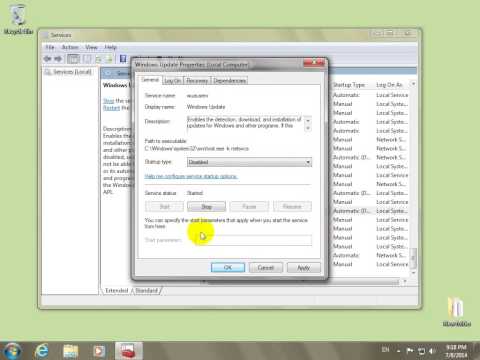
To disable Windows Update try the following:
- go to the Start Menu
- type "Run" and click on Run
- type SERVICES.MSC and click OK
- scroll down to Windows Update and double-click it
- at Startup Type select Disabled
- click The Stop button
- click OK
*under Windows 10 the Windows Update service will re-enabling itself even after is disabled and stopped!
To disable Windows Update try the following:
- go to the Start Menu
- type "Run" and click on Run
- type SERVICES.MSC and click OK
- scroll down to Windows Update and double-click it
- at Startup Type select Disabled
- click The Stop button
- click OK
*under Windows 10 the Windows Update service will re-enabling itself even after is disabled and stopped!
About this tutorial
furulevi published this 2:16 video tutorial on November 8, 2014. It has been watched 511,643 times on YouTube.
- Channel
- furulevi
- Category
- Science & Technology
- Duration
- 2:16
- Published
- November 8, 2014
- Views
- 511,643
- Likes
- 5,295
Tags
Share
This tutorial in other languages
- FRComment complètement mise à jour Désactiver Windows (Windows 7)
- ESCómo desactivar completamente la actualización de Windows (Windows 7)
- PTComo desativar completamente o Windows Update (Windows 7)
- ITCome disabilitare completamente Windows Update (Windows 7)
- DEWie vollständig Deaktivieren von Windows Update (Windows 7)
- NLHoe kan ik volledig uit te schakelen Windows Update (Windows 7)
- RUКак полностью отключить Windows Update (Windows 7)
- PLJak całkowicie wyłączyć Windows Update (Windows 7)
- JA完全に無効にする方法のWindows Update(Windows 7の)
- ARكيفية تماما تعطيل تحديث ويندوز (ويندوز 7)
- HIकैसे करने के लिए पूरी तरह से अक्षम Windows अद्यतन (विंडोज 7)
- IDCara Completely Nonaktifkan Windows Update (Windows 7)