Playback starts YouTube’s embedded player (privacy-enhanced mode).
How to Defrag a Computer
ChannelHowcastDescription from the creator
Full Playlist: youtube.com/playlist?list=PLLALQuK1NDrheOFip252…
-
-
Watch more How to Understand Computers videos: howcast.com/videos/292664-How-to-Defrag-a-Compu…
Defrag your computer's hard drive weekly to prevent errors and keep your system running in tip-top shape.
Step 1: Find My Computer
Click on the Start button and then on My Computer.
Step 2: Navigate to C: drive properties
Right-click on the icon labeled Local Disk (C:) and select Properties.
Step 3: Select the defragmenter
Select the Tools tab from the Properties menu and click on the Defragment Now button.
Tip
Alternatively, click the Start button, and then navigate through All Programs, Accessories and System Tools to get to Disk Defragmenter.
Step 4: Analyze fragmentation
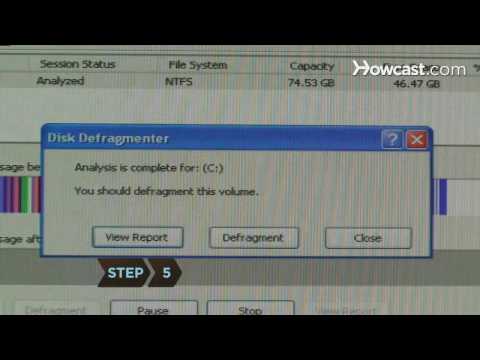
Click the Analyze button in the Disk Defragmenter window to analyze the extent of fragmentation. Decide whether to continue with defragmentation based on the computer’s recommendation.
Step 5: Start defragmentation
Click on the Defragment button if you wish to continue and patiently wait for the operation to complete.
Tip
Perform this operation when you are not using your computer – it can take several hours.
Step 6: Restart your computer
Restart your computer after the operation has completed and enjoy a bit more speed when accessing your files.
Did You Know?
Did you know? IBM invented the first magnetic hard drive in 1956. It consisted of 50 21-inch disks and had a capacity of just five megabytes.
-
-
Watch more How to Understand Computers videos: howcast.com/videos/292664-How-to-Defrag-a-Compu…
Defrag your computer's hard drive weekly to prevent errors and keep your system running in tip-top shape.
Step 1: Find My Computer
Click on the Start button and then on My Computer.
Step 2: Navigate to C: drive properties
Right-click on the icon labeled Local Disk (C:) and select Properties.
Step 3: Select the defragmenter
Select the Tools tab from the Properties menu and click on the Defragment Now button.
Tip
Alternatively, click the Start button, and then navigate through All Programs, Accessories and System Tools to get to Disk Defragmenter.
Step 4: Analyze fragmentation
Click the Analyze button in the Disk Defragmenter window to analyze the extent of fragmentation. Decide whether to continue with defragmentation based on the computer’s recommendation.
Step 5: Start defragmentation
Click on the Defragment button if you wish to continue and patiently wait for the operation to complete.
Tip
Perform this operation when you are not using your computer – it can take several hours.
Step 6: Restart your computer
Restart your computer after the operation has completed and enjoy a bit more speed when accessing your files.
Did You Know?
Did you know? IBM invented the first magnetic hard drive in 1956. It consisted of 50 21-inch disks and had a capacity of just five megabytes.
About this tutorial
Howcast published this 1:15 video tutorial on November 2, 2010. It has been watched 22,420 times on YouTube.
- Channel
- Howcast
- Category
- Science & Technology
- Duration
- 1:15
- Published
- November 2, 2010
- Views
- 22,420
- Likes
- 61
Tags
Share
This tutorial in other languages
- FRComment défragmenter un ordinateur
- ESCómo desfragmentar un ordenador
- PTComo Defrag um computador
- ITCome Defrag di un computer
- DEWie ein Computer-Defrag
- NLHoe maak je een computer defragmenteren
- RUКак Defrag компьютера
- PLJak defragmentować komputer
- JAコンピュータをデフラグする方法
- ARكيفية ديفراغ كمبيوتر
- HIकैसे एक कंप्यूटर Defrag करने के लिए
- IDCara untuk Defrag Komputer