Playback starts YouTube’s embedded player (privacy-enhanced mode).
How to Edit Mp3 Audio Files
ChannelHowcastDescription from the creator
Full Playlist: youtube.com/playlist?list=PLLALQuK1NDrgBJWGd8Pb…
-
-
Watch more How to Use Computer Software videos: howcast.com/videos/354800-How-to-Edit-Mp3-Audio…
Almost everyone listens to mp3s on their computer or portable player, but if you have a few that need cleaning up, follow these tips to edit audio like a pro.
Step 1: Download software
Download or buy audio editing software. Audacity is a free audio editing program and is available to download at audacity.sourceforge.net/.
Step 2: Open the program
Open the program once you've installed it. To import an mp3, click Project and then Import Audio.
Tip
Audacity allows you to import WAV, AIFF, MP3, AND Ogg Vorbis files and, with the help of an encoder, export them as mp3s.
Step 3: Highlight
Highlight the area of the song you want to manipulate by using the selection tool -- it looks like a capital I -- and dragging it from the beginning of the section you want to manipulate.
Step 4: Cut and paste
To cut the section out of the song, click Edit and then Cut hold Control plus Z. To paste the cut section elsewhere, position the selection tool where you want to paste and click Edit and Paste or hold Control plus V.
Step 5: Add effects
Click on Effect and browse the numerous options you have. If you want to add echo, highlight your song and click Effect and Echo. Or, if you want to clean up noise in the recording, click Effect and then Noise Removal. Most editing programs will take a sample of your recording and tweak your audio accordingly.
Tip
Remember to save your work. If something unexpected happes, you could lose everything.
Step 6: Download encoder
Download an mp3 encoder to export your mp3. Some editing software don't encode mp3s, so you will need to download an encoder.
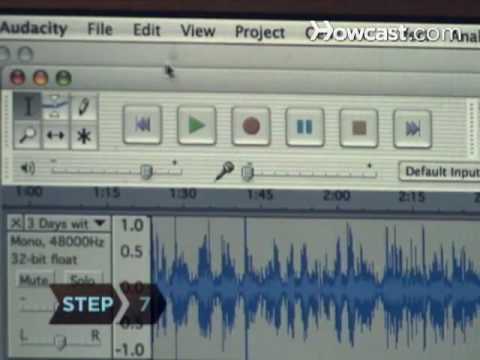
Step 7: Export
Export your audio by selecting File and then Export as mp3. There is also the option to export it as a WAV file or a Ogg Vorbis. Now, load up your edited audio onto your mp3 player, and hit the streets!
Did You Know?
The mp3 began its early life in Germany when Professor Dieter Seitzer began working to transmit speech in high quality over phone lines.
-
-
Watch more How to Use Computer Software videos: howcast.com/videos/354800-How-to-Edit-Mp3-Audio…
Almost everyone listens to mp3s on their computer or portable player, but if you have a few that need cleaning up, follow these tips to edit audio like a pro.
Step 1: Download software
Download or buy audio editing software. Audacity is a free audio editing program and is available to download at audacity.sourceforge.net/.
Step 2: Open the program
Open the program once you've installed it. To import an mp3, click Project and then Import Audio.
Tip
Audacity allows you to import WAV, AIFF, MP3, AND Ogg Vorbis files and, with the help of an encoder, export them as mp3s.
Step 3: Highlight
Highlight the area of the song you want to manipulate by using the selection tool -- it looks like a capital I -- and dragging it from the beginning of the section you want to manipulate.
Step 4: Cut and paste
To cut the section out of the song, click Edit and then Cut hold Control plus Z. To paste the cut section elsewhere, position the selection tool where you want to paste and click Edit and Paste or hold Control plus V.
Step 5: Add effects
Click on Effect and browse the numerous options you have. If you want to add echo, highlight your song and click Effect and Echo. Or, if you want to clean up noise in the recording, click Effect and then Noise Removal. Most editing programs will take a sample of your recording and tweak your audio accordingly.
Tip
Remember to save your work. If something unexpected happes, you could lose everything.
Step 6: Download encoder
Download an mp3 encoder to export your mp3. Some editing software don't encode mp3s, so you will need to download an encoder.
Step 7: Export
Export your audio by selecting File and then Export as mp3. There is also the option to export it as a WAV file or a Ogg Vorbis. Now, load up your edited audio onto your mp3 player, and hit the streets!
Did You Know?
The mp3 began its early life in Germany when Professor Dieter Seitzer began working to transmit speech in high quality over phone lines.
About this tutorial
Howcast published this 2:12 video tutorial on November 3, 2010. It has been watched 356,217 times on YouTube.
- Channel
- Howcast
- Category
- Science & Technology
- Duration
- 2:12
- Published
- November 3, 2010
- Views
- 356,217
- Likes
- 766
Tags
Share
This tutorial in other languages
- FRComment éditer les fichiers MP3 fichiers audio
- ES¿Cómo editar archivos de audio Mp3
- PTComo editar MP3 arquivos de áudio
- ITCome modificare file audio MP3
- DEWie zu bearbeiten MP3-Audiodateien
- NLHoe te bewerken MP3-audiobestanden
- RUКак редактировать MP3 аудио файлов
- PLJak edytować pliki audio MP3
- JAどのように編集MP3オーディオファイルへ
- ARكيفية تحرير ملفات الصوت MP3
- HIकैसे संपादित Mp3 ऑडियो फ़ाइलें करने के लिए
- IDCara Mengedit Mp3 Audio File