Playback starts YouTube’s embedded player (privacy-enhanced mode).
How to Fix Software Installation Error in Windows 10/8.1/7 Fail Can’t Install
ChannelMDTechVideosDescription from the creator
How to Fix Software Installation Error in Windows 10/8.1/7 Fail Can’t Install.
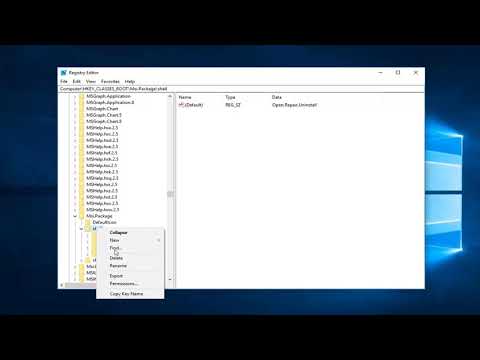
Registry Entry: msiexec /i "%1"
Software installation errors in Windows can be frustrating, especially when you encounter problems during the setup of new applications or updates. These errors can be caused by a variety of factors, including corrupt system files, incompatible software, insufficient system permissions, or conflicts with antivirus programs. In some cases, the issue may occur due to outdated or missing Windows components, such as the .NET Framework or specific drivers. Identifying the cause of the software installation error is essential to applying the right fix and ensuring smooth installation.
This tutorial provides step-by-step solutions to fix software installation errors in Windows 11, 10, 8.1, and 7. It covers troubleshooting methods such as running the Windows troubleshooter, checking system requirements, resolving permission issues, and installing missing components. The guide also explains how to disable antivirus software temporarily, clear corrupted installation files, and update essential system components. By following these steps, you can resolve installation errors and successfully install your desired software on your Windows system.
Like any complex piece of software, Windows 10 and its installation process is vulnerable to mistakes, glitches, and hardware errors. That being the case, here are some of the most commonly-encountered problems that arise when installing or upgrading to the new version of Windows. If you’ve got Windows 10 installation problems, you’ve come to the right place.
This tutorial will apply for computers, laptops, desktops, and tablets running the Windows 10, Windows 8/8.1, Windows 7 operating systems. Works for all major computer manufactures (Dell, HP, Acer, Asus, Toshiba, Lenovo, Samsung).
Registry Entry: msiexec /i "%1"
Software installation errors in Windows can be frustrating, especially when you encounter problems during the setup of new applications or updates. These errors can be caused by a variety of factors, including corrupt system files, incompatible software, insufficient system permissions, or conflicts with antivirus programs. In some cases, the issue may occur due to outdated or missing Windows components, such as the .NET Framework or specific drivers. Identifying the cause of the software installation error is essential to applying the right fix and ensuring smooth installation.
This tutorial provides step-by-step solutions to fix software installation errors in Windows 11, 10, 8.1, and 7. It covers troubleshooting methods such as running the Windows troubleshooter, checking system requirements, resolving permission issues, and installing missing components. The guide also explains how to disable antivirus software temporarily, clear corrupted installation files, and update essential system components. By following these steps, you can resolve installation errors and successfully install your desired software on your Windows system.
Like any complex piece of software, Windows 10 and its installation process is vulnerable to mistakes, glitches, and hardware errors. That being the case, here are some of the most commonly-encountered problems that arise when installing or upgrading to the new version of Windows. If you’ve got Windows 10 installation problems, you’ve come to the right place.
This tutorial will apply for computers, laptops, desktops, and tablets running the Windows 10, Windows 8/8.1, Windows 7 operating systems. Works for all major computer manufactures (Dell, HP, Acer, Asus, Toshiba, Lenovo, Samsung).
About this tutorial
MDTechVideos published this 4:35 video tutorial on October 25, 2019. It has been watched 1,126,026 times on YouTube.
- Channel
- MDTechVideos
- Category
- Science & Technology
- Duration
- 4:35
- Published
- October 25, 2019
- Views
- 1,126,026
- Likes
- 6,944
Tags
Share
This tutorial in other languages
- FRComment réparer une erreur d'installation du logiciel sous Windows 10 / 8.1 / 7 Fail ne peut pas installer
- ESCómo corregir un error de software de instalación en Windows 10 / 8,1 / 7 Falla Can not Instalar
- PTComo corrigir Software Erro de instalação no Windows 10 / 8,1 / 7 Falha Não pode instalar
- ITCome risolvere installazione del software di errore in Windows 10 / 8,1 / 7 Fail Can not Installa
- DEWie Fix Fehler Software-Installation unter Windows 10 / 8.1 / 7 Fehler keine Installation
- NLHow To Fix installatie van de software fout in Windows 10 / 8.1 / 7 Fail kan niet installeren
- RUКак исправить ошибки программного обеспечения установки в ОС Windows 10 / 8,1 / 7 Сбой не может установить
- PLJak naprawić Software Błąd instalacji w systemie Windows 10 / 8,1 / 7 Fail nie można zainstalować
- JA7月10日/ 8.1のWindowsでのソフトウェアのインストールエラーを修正失敗することはありませんインストールする方法
- ARكيفية إصلاح البرامج خطأ التثبيت في نظام التشغيل Windows 10 / 8.1 / 7 فشل تعذر تثبيت
- HIकैसे Windows में ठीक करने के लिए सॉफ्टवेयर स्थापना त्रुटि 10 / 8.1 / 7 असफल हो सकता है नहीं स्थापित करें
- IDCara Memperbaiki Software Installation Error pada Windows 10 / 8.1 / 7 Gagal Can tidak Instal