Playback starts YouTube’s embedded player (privacy-enhanced mode).
How to Get Pictures from Video
ChannelHowcastDescription from the creator
Full Playlist: youtube.com/playlist?list=PLLALQuK1NDrjGK0Kri3c…
-
-
Great Amazon Must Haves for Digital Photographers:
Adobe Photoshop Lightroom 6: amzn.to/1XhdDsk
Professional Cleaning Set for DSLR Cameras: amzn.to/1L5NuU1
Think Tank DSLR Battery Holder: amzn.to/1IKmh7J
Joby GP8-BHEN GorillaPod Focus with Ballhead X bundle: amzn.to/1LV3RIK
Case Logic SLRC-206 SLR Camera Backpack: amzn.to/1fVAyHE
Transcend USB 3.0 Super Speed Multi-Card Reader: amzn.to/1EzCmSf
Watch more Photography Tips & Techniques videos: howcast.com/videos/410874-How-to-Get-Pictures-f…
Carrying a camera and a video camera to record those special moments can be cumbersome. Don't worry about taking photographs anymore when you can get stills from video.
Step 1: Download a video software
Download a free video still extractor program. For Windows users, VLC Media Player supports all video file types. For Mac users, imToo Video to Picture supports all video file types.
Step 2: Install software
Install the software that you have downloaded and save it in your program files.
Step 3: Open video file
Open the extractor program and then open the video file that contains the frame that you want a snapshot of.
Step 4: Play the video
Play the video until you locate the moment in the video that you want to capture and pause the video at that point.
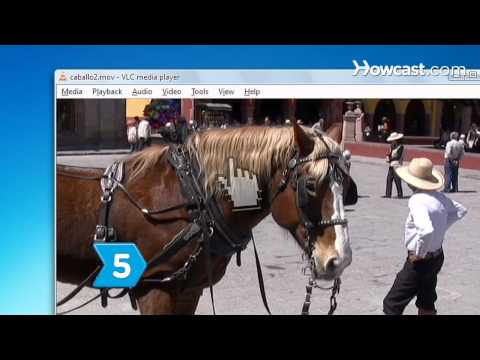
Step 5: Select SnapShot from Video menu
Select the video from the main menu bar. Then select SnapShot from the drop-down menu. Mac users will use the capture function.
Tip
If you're using VLC Player, images will automatically be saved in your My Pictures folder.
Step 6: Locate image
Locate the file and rename it, or move it to another folder to keep track of it. If you're using a Mac, you will need to save from the capture screen, and you can name the file anything you want. Now turn all of your favorite video moments into photos!
Did You Know?
In 2002, Star Wars Episode II: Attack of the Clones became the first feature film entirely shot using digital technology.
-
-
Great Amazon Must Haves for Digital Photographers:
Adobe Photoshop Lightroom 6: amzn.to/1XhdDsk
Professional Cleaning Set for DSLR Cameras: amzn.to/1L5NuU1
Think Tank DSLR Battery Holder: amzn.to/1IKmh7J
Joby GP8-BHEN GorillaPod Focus with Ballhead X bundle: amzn.to/1LV3RIK
Case Logic SLRC-206 SLR Camera Backpack: amzn.to/1fVAyHE
Transcend USB 3.0 Super Speed Multi-Card Reader: amzn.to/1EzCmSf
Watch more Photography Tips & Techniques videos: howcast.com/videos/410874-How-to-Get-Pictures-f…
Carrying a camera and a video camera to record those special moments can be cumbersome. Don't worry about taking photographs anymore when you can get stills from video.
Step 1: Download a video software
Download a free video still extractor program. For Windows users, VLC Media Player supports all video file types. For Mac users, imToo Video to Picture supports all video file types.
Step 2: Install software
Install the software that you have downloaded and save it in your program files.
Step 3: Open video file
Open the extractor program and then open the video file that contains the frame that you want a snapshot of.
Step 4: Play the video
Play the video until you locate the moment in the video that you want to capture and pause the video at that point.
Step 5: Select SnapShot from Video menu
Select the video from the main menu bar. Then select SnapShot from the drop-down menu. Mac users will use the capture function.
Tip
If you're using VLC Player, images will automatically be saved in your My Pictures folder.
Step 6: Locate image
Locate the file and rename it, or move it to another folder to keep track of it. If you're using a Mac, you will need to save from the capture screen, and you can name the file anything you want. Now turn all of your favorite video moments into photos!
Did You Know?
In 2002, Star Wars Episode II: Attack of the Clones became the first feature film entirely shot using digital technology.
About this tutorial
Howcast published this 1:33 video tutorial on October 28, 2010. It has been watched 79,532 times on YouTube.
- Channel
- Howcast
- Category
- Science & Technology
- Duration
- 1:33
- Published
- October 28, 2010
- Views
- 79,532
- Likes
- 231
Tags
Share
This tutorial in other languages
- FRComment Obtenir les photos de la vidéo
- ESCómo obtener imágenes de vídeo
- PTComo Chegar Imagens de Vídeo
- ITCome ottenere immagini da video
- DEWie Bilder aus dem Video Get
- NLHow to Get Foto's van Video
- RUКак получить изображения из видео
- PLJak uzyskać Obrazki z wideo
- JA動画から写真を取得する方法
- ARكيفية الحصول على صور من الفيديو
- HIकैसे वीडियो से चित्र प्राप्त करने के लिए
- IDBagaimana Mendapatkan Gambar dari Video