Playback starts YouTube’s embedded player (privacy-enhanced mode).
How to RESET Windows 10 to FACTORY Settings – Options Explained
ChannelHome Tech DIYDescription from the creator
4TB External Hard Drive - amzn.to/2XC8ceD
500GB Samsung SSD - amzn.to/31tt6Ob
8TB Purple WD Hard Drive - amzn.to/3iwJdRZ
💻💻💻💻💻 Blue Iris (Security Camera Video Management Software): hometechdiy.com/buy-blue-iris/
Blog post for more information: hometechdiy.com/windows_reset/
Today I’m going to walk through the steps of resetting a Windows 10 PC back to factory defaults. This process restores Windows back to day 1; to its out-of-the-box settings and removes all installed programs. But what about your Windows profiles and personal files? Before you start, there are 2 main options you need to be prepared to decide upon; keep data files or delete all data files. I’ll take you through both of these processes and explain the impacts of one option over the next.
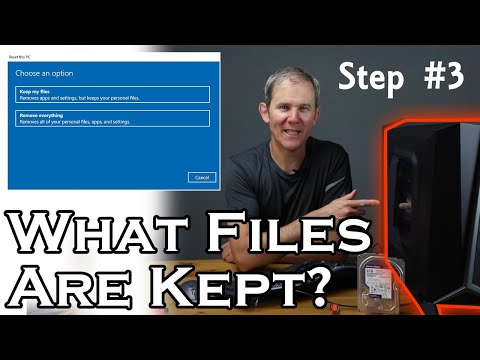
Let’s talk about the first option. This one is great if you are having software issues, like Windows updates failures, operating system or Windows crashes or complex errors you just can’t figure out. Also, if your PC is performing slower than normal or if there is just a ton of junk programs on there you just want cleaned out.
When selecting option 1, here is what are you keeping and what you are deleting:
• Kept – User profiles. This includes the files and subfolders under c:\users\USERPROFILE for each user, except Public. Within each of these profiles we have the desktop, documents, downloads, pictures, favorites, and videos. This means your profile will be saved including your user name and password to access Windows after the reset is complete.
• Not Kept – As a part of the user profile, the AppData folder is not saved. This is application related data such as setting, program files and data specific to the apps on the PC.
• Not kept – Back up to user profiles level there is a shared profile called Public. Like I mentioned, this will be deleted.
• Kept - Files and folders are safe on the root of your C:\ drive (assuming that is the drive letter where Windows is installed).
• Kept – No other drives are touched (like other connected internal or USB hard drives or thumb drives). This also would include any hard drive partitions.
• Not Kept - Mappings however to network drives are dropped but the drives aren’t touched, just the access to the drives.
• Not kept – Since programs will be removed, the program files under the folder Program Files, Program Files (x86), ProgramData, and Windows will all be deleted and replaced with the default or factory files. If you installed programs on another hard drive or partition, their future is questionable, depending on where the original files were installed and registered for the application. They won’t be deleted since only the C:\ is impacted but, if any of the install files ended up here on the C:\, the program may not work.
• Not kept - Lastly, any shortcuts for applications on the desktop will also be removed, once the corresponding program is deleted.
Option 2 is called; “Remove everything”. This is a more drastic reset and used when there are major application issues you cannot solve, if your PC has a virus you cannot get rid of, it’s the next step if the restore previous option of “Keep my files” didn’t solve your problems, or if you want to start over with a clean slate, like if you were going to sell or repurpose the PC. This process deletes everything which is deleted in the previous option, but “Remove everything” also wipes out all Windows profiles and everything on the C:\ drive. Personal data files are questionable, but we’ll get to that shortly.
By the way, these processes won’t impact any BIOS setting like firmware, boot sequence or RAID setup.
Before proceeding with any factory reset, I strongly encourage a backup of critical files such as data files, application settings files and any application license keys you may have in case you want to reinstall an application, after doing the cleanup.
1. “Data erasure” is how personal data files will be deleted. This is your Windows profiles and the root of the C:\ drive or additional drives you select in the next option:
a. Off - Just deletes your files.
b. On - Deletes your files and overwrites the file so they cannot be recovered. This is a good option if you are selling your computer and want to make sure your data is unrecoverable.
2. The “Data drives” option is what drives will be wiped clean.
a. Off - Will delete all the files from the C:\ drive where Windows is installed. Partitions on this drive are not impacted.
b. On - Deletes all files from the C:\ drive and any other internal hard drives connected directly to the motherboard. This also includes any files or folders on partitions on these drives (The partition will not be removed but the files/folders will). Connected USB Flash drives or USB external drives will not be impacted.
Alright guys, that covers all the options when resetting Windows 10 back to factory defaults. Please like and subscribe for more Home Tech projects.
About this tutorial
Home Tech DIY published this 10:20 video tutorial on August 26, 2020. It has been watched 46,550 times on YouTube.
- Channel
- Home Tech DIY
- Category
- Science & Technology
- Duration
- 10:20
- Published
- August 26, 2020
- Views
- 46,550
- Likes
- 519
Share
Further reading
-
How to Factory Reset Windows 10
howtogeek.com
When you’re ready to factory reset your Windows 10 PC, open the Windows Settings menu by clicking on the Start button and then selecting the Gear icon. The Settings window will now appear. Here, select the “Update & Sec…
-
How to Factory Reset Windows 10 | PCMag
pcmag.com
If your Windows 10 machine isn’t working as well as it should be, it might be time to restore the computer to its out-of-the-box settings. Here’s how to factory reset your PC.
-
How to reset a Windows 10 PC to factory settings | Windows ...
windowscentral.com
To reset a computer to factory settings using the Windows 10 original image, use these steps: Important: If you use this option on a branded computer, you may lose the ability to use the custom ...
This tutorial in other languages
- FRComment réinitialiser de Windows 10 réglages usine - Options Expliqué
- ESCómo reiniciar Windows 10 a la configuración de fábrica - Opciones Explicación
- PTComo reiniciar o Windows 10 a configurações de fábrica - Opções Explicou
- ITCome ripristinare Windows 10 alle impostazioni di fabbrica - Opzioni Explained
- DEWie Zurücksetzen von Windows 10 auf die Werkseinstellungen - Optionen Erklärt
- NLOver het herstellen van Windows 10 naar de fabrieksinstellingen - Opties Explained
- RUКак сбросить Windows 10 к заводским установкам - Параметры Разъяснения
- PLJak zresetować system Windows 10 do ustawień fabrycznych - Opcje Poradnik
- JAオプション説明 - 工場出荷時設定へのWindows 10をリセットする方法
- ARكيفية إعادة تعيين ويندوز 10 إلى إعدادات المصنع - خيارات وأوضح
- HIफ़ैक्टरी सेटिंग पर Windows 10 पुनर्स्थापित करने के लिए कैसे - विकल्प समझाया
- IDCara RESET Windows 10 untuk PABRIK Pengaturan - Pilihan Dijelaskan