Playback starts YouTube’s embedded player (privacy-enhanced mode).
How to compose an email message using Gmail - Gmail Tutorials
ChannelkvchostingDescription from the creator
How to compose an email message using Gmail
• Log in to your Gmail account.
• Click on Compose mail option.
• Fill To field to specify the recipient of your email.
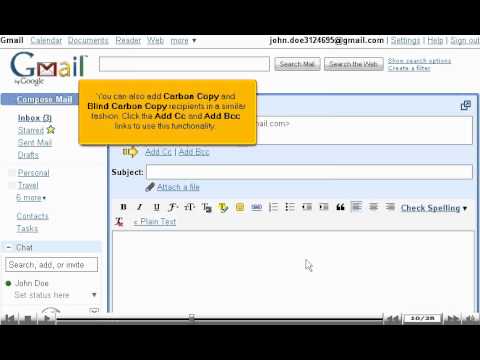
• Add Cc for the copy of email you wish to send and they are the secondary recipients of email. Bcc option is Blind Carbon Copy option and enter the email ID of the people to whom you do not want to show the To or Cc stream email addresses.
• You can send mail to one contact or multiple contacts at one time.
• Fill in the body of message. There are formatting options available for body field.
• You can also add attachments in an email by clicking on 'Attach a file'. There can be simultaneously many files added, but they should not exceed 20 MB.
• Gmail will automatically save the draft of your email. Also, you have an option to save the email in drafts and send it later. You can also delete the draft by clicking on discard option.
• When you want to send the email, you can click on Send button.
• Log in to your Gmail account.
• Click on Compose mail option.
• Fill To field to specify the recipient of your email.
• Add Cc for the copy of email you wish to send and they are the secondary recipients of email. Bcc option is Blind Carbon Copy option and enter the email ID of the people to whom you do not want to show the To or Cc stream email addresses.
• You can send mail to one contact or multiple contacts at one time.
• Fill in the body of message. There are formatting options available for body field.
• You can also add attachments in an email by clicking on 'Attach a file'. There can be simultaneously many files added, but they should not exceed 20 MB.
• Gmail will automatically save the draft of your email. Also, you have an option to save the email in drafts and send it later. You can also delete the draft by clicking on discard option.
• When you want to send the email, you can click on Send button.
About this tutorial
kvchosting published this 4:53 video tutorial on November 15, 2010. It has been watched 53,921 times on YouTube.
- Channel
- kvchosting
- Category
- Howto & Style
- Duration
- 4:53
- Published
- November 15, 2010
- Views
- 53,921
- Likes
- 176
Tags
Share
This tutorial in other languages
- FRComment composer un message électronique à l'aide de Gmail - Tutoriels Gmail
- ESCómo redactar un mensaje de correo electrónico a través de Gmail - Gmail tutoriales
- PTComo compor uma mensagem de e-mail usando o Gmail - Gmail Tutoriais
- ITCome comporre un messaggio e-mail tramite Gmail - Gmail Tutorial
- DEGmail Tutorials - wie eine E-Mail mit Google Mail zu schreiben
- NLHoe kan ik een e-mail bericht op te stellen met behulp van Gmail - Gmail Tutorials
- RUКак составить сообщение электронной почты с помощью Gmail - Gmail Учебники
- PLJak komponować wiadomości e-mail za pomocą Gmaila - Gmail Poradniki
- JAGmailのチュートリアル - Gmailのを使用して電子メールメッセージを作成する方法
- ARكيفية إنشاء رسالة بريد إلكتروني باستخدام جوجل - جوجل دروس
- HIकैसे एक ई-मेल संदेश लिखने के लिए जीमेल का प्रयोग - जीमेल ट्यूटोरियल
- IDCara menulis pesan email menggunakan Gmail - Gmail Tutorial