Playback starts YouTube’s embedded player (privacy-enhanced mode).
How to configure an email account in Outlook 2007 - Configuring Email Tutorials
ChannelkvchostingDescription from the creator
How to configure an email account in Outlook 2007
Create your new email account in your web hosting account, typically from cPanel.
• Click on tools section in task bar and then click 'Account Settings' tab. The email account window will appear.
• Click new button on left side and fill in your name, email address and password fields in it and check on the option of manually configuring the server settings. Click next button.
• Make sure that Internet email button is clicked in this window. Click on next button.
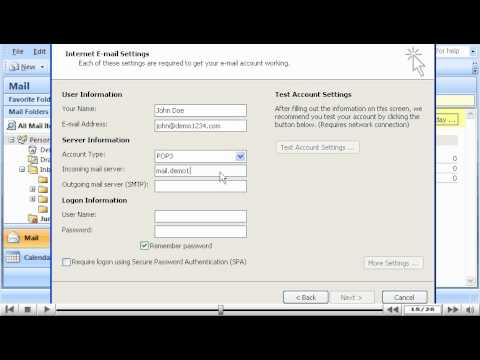
• Email settings page will appear and you can fill in your name, email ID, server information-Incoming and outgoing server, the logon information provided to you by your host. Click on More settings tab in the same window and in outgoing server option, check on SMTP authentication option. SMTP authentication assures that Outlook will login to your email server, even when sending emails, ensuring that emails are sent by you only. Press OK and click on Next button.
• Click on Finish button in the next window.
Email account is successfully set up.
Create your new email account in your web hosting account, typically from cPanel.
• Click on tools section in task bar and then click 'Account Settings' tab. The email account window will appear.
• Click new button on left side and fill in your name, email address and password fields in it and check on the option of manually configuring the server settings. Click next button.
• Make sure that Internet email button is clicked in this window. Click on next button.
• Email settings page will appear and you can fill in your name, email ID, server information-Incoming and outgoing server, the logon information provided to you by your host. Click on More settings tab in the same window and in outgoing server option, check on SMTP authentication option. SMTP authentication assures that Outlook will login to your email server, even when sending emails, ensuring that emails are sent by you only. Press OK and click on Next button.
• Click on Finish button in the next window.
Email account is successfully set up.
About this tutorial
kvchosting published this 3:28 video tutorial on October 26, 2011. It has been watched 719,456 times on YouTube.
- Channel
- kvchosting
- Category
- Howto & Style
- Duration
- 3:28
- Published
- October 26, 2011
- Views
- 719,456
- Likes
- 1,499
Tags
Share
This tutorial in other languages
- FRComment configurer un compte de messagerie dans Outlook 2007 - Configuration Tutoriels Email
- ESCómo configurar una cuenta de correo electrónico en Outlook 2007 - Configuración de correo electrónico tutoriales
- PTComo configurar uma conta de e-mail no Outlook 2007 - Configurando Tutoriais Email
- ITCome configurare un account di posta in Outlook 2007 - Configurazione Tutorial Email
- DEKonfigurieren von E-Mail-Tutorials - wie ein E-Mail-Konto in Outlook 2007 konfigurieren
- NLHoe kan ik een e-mailaccount te configureren in Outlook 2007 - E-mail Tutorials configureren
- RUКак настроить учетную запись электронной почты в Outlook 2007 - Настройка электронной почты Tutorials
- PLJak skonfigurować konto e-mail w programie Outlook 2007 - konfiguracja Poradniki Email
- JAOutlook 2007で電子メールアカウントを設定する方法 - の設定電子メールのチュートリアル
- ARكيفية تكوين حساب بريد إلكتروني في Outlook 2007 - تكوين دروس البريد الإلكتروني
- HIकैसे आउटलुक 2007 में एक ई-मेल खाता कॉन्फ़िगर करने के - ईमेल ट्यूटोरियल का विन्यास
- IDCara mengkonfigurasi account email di Outlook 2007 - Konfigurasi Tutorial Email