Playback starts YouTube’s embedded player (privacy-enhanced mode).
Darik's Boot And Nuke (DBAN) - Wipe Your Hard Drive - Complete Tutorial
ChannelMDTechVideosDescription from the creator
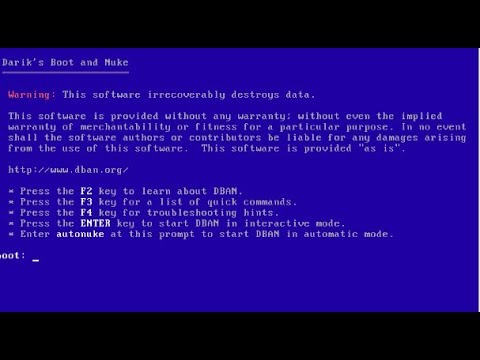
How to clean wipe your hard drive using Dariks Boot and Nuke.
Description of Software From Developers:
DBAN is intended for individuals or home use to support data erasure needs. For a comprehensive certified data erasure solution in companies and organizations, including reporting, Blancco is the recommended security solution.
Your hard drive is a treasure trove of personal information. You don’t want it getting into the wrong hands if you ever get rid of your computer. An interesting study was done, in which hundreds of computers were bought secondhand and scoured for personal data. They found a lot. Some drives even had enough data to completely steal the previous owner’s identity.
So for the sake of your privacy and security, you absolutely need to “sanitize” your data before handing your drive over to someone else. Darik’s Boot And Nuke (DBAN) can help you with that. For a more in-depth look at data destruction, check out my tutorial How Does Digital File Shredding Work?
DBAN is a program that wipes your entire hard drive so that it’s no longer readable. There are several tools that do this, but DBAN is one of the most popular.
This tutorial will apply for computers, laptops, desktops,and tablets running the Windows 10, Windows 8/8.1, Windows 7 operating systems.Works for all major computer manufactures (Dell, HP, Acer, Asus, Toshiba, Lenovo, Samsung).
Description of Software From Developers:
DBAN is intended for individuals or home use to support data erasure needs. For a comprehensive certified data erasure solution in companies and organizations, including reporting, Blancco is the recommended security solution.
Your hard drive is a treasure trove of personal information. You don’t want it getting into the wrong hands if you ever get rid of your computer. An interesting study was done, in which hundreds of computers were bought secondhand and scoured for personal data. They found a lot. Some drives even had enough data to completely steal the previous owner’s identity.
So for the sake of your privacy and security, you absolutely need to “sanitize” your data before handing your drive over to someone else. Darik’s Boot And Nuke (DBAN) can help you with that. For a more in-depth look at data destruction, check out my tutorial How Does Digital File Shredding Work?
DBAN is a program that wipes your entire hard drive so that it’s no longer readable. There are several tools that do this, but DBAN is one of the most popular.
This tutorial will apply for computers, laptops, desktops,and tablets running the Windows 10, Windows 8/8.1, Windows 7 operating systems.Works for all major computer manufactures (Dell, HP, Acer, Asus, Toshiba, Lenovo, Samsung).
About this tutorial
MDTechVideos published this 4:42 video tutorial on November 11, 2017. It has been watched 212,467 times on YouTube.
- Channel
- MDTechVideos
- Category
- Science & Technology
- Duration
- 4:42
- Published
- November 11, 2017
- Views
- 212,467
- Likes
- 1,186
Tags
Share
This tutorial in other languages
- FREt Nuke Boot Darik (de DBAN) - Wipe votre disque dur - Complete Tutorial
- ESDe arranque y Nuke Darik (DBAN) - limpiar su disco duro - Tutorial Completo
- PTBoot and Nuke Darik (DBAN) - Limpe seu disco rígido - Tutorial completo
- ITDarik Boot e Nuke (DBAN) - Wipe Your Hard Drive - Complete Tutorial
- DEDarik Der Stiefel Und Nuke (DBAN) - Wischen Sie Ihre Festplatte - komplette Tutorial
- NLDarik's Boot en Nuke (DBAN) - veeg je harde schijf - Compleet Tutorial
- RUДарик загрузка и Nuke (DBAN) - вытри жесткого диска - полный учебник
- PLDarik Boot and Nuke użytkownika (DBAN) - Wipe dysku twardego - Complete Tutorial
- JADarikのブートおよびハァハァ(DBAN) - ハードドライブをワイプ - 完全なチュートリアル
- ARداريك في التمهيد والاسرائيلية المصرية في خطر (DBAN) - مسح القرص الصلب الخاص بك - كاملة دروس
- HIDarik की बूट और परमाणु (DBAN) - साफ कर लें आपका हार्ड ड्राइव - संपूर्ण प्रशिक्षण सामग्री
- IDDarik Boot Dan Nuke (DBAN) - Usap Hard Drive Anda - Complete Tutorial