Playback starts YouTube’s embedded player (privacy-enhanced mode).
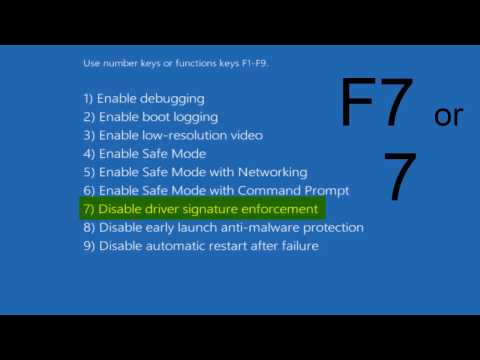
How To Disable Driver Signature Enforcement in Windows 10
ChannelMDTechVideosDescription from the creator
How to disable driver signature enforcement Windows 10.
Microsoft includes a feature in Windows 10 and Windows 8 called “driver signature enforcement” feature. They’ll only load drivers that have been signed by Microsoft. To install less-than-official drivers, old unsigned drivers, or drivers you’re developing yourself, you’ll need to disable driver signature enforcement.
Before you begin, keep in mind: Microsoft isn’t just trying to make your life harder here. Driver signing enforcement ensures that only drivers that have been sent to Microsoft for signing will load into the Windows kernel. This prevents malware from burrowing its way into the Windows kernel.
Disable driver signing and you’ll be able to install drivers that weren’t officially signed. Be sure you know what you’re doing! You should only install drivers you trust.
Common Errors Associated With Driver Signature Enforcement :
A Digitally Signed Driver Is Required, Windows requires a digitally signed driver.
OR
A recently installed program tried to install an unsigned driver. This version of Windows requires all drivers to have a valid digital signature. The driver is unavailable and the program that uses this driver might not work correctly. Uninstall the program or device that uses this driver and check the publishers support website to get a digitally signed driver.
OR
In reverse of this, an error for a Steam game appears to deliver the following error:
EasyAntiCheat cannot run if Driver Signature Enforcement has been disabled
To quickly fix the last error mentioned, run these commands from command-line as Administrator and restart Windows for changes to take effect:
bcdedit.exe -set TESTSIGNING OFF
bcdedit.exe -set NOINTEGRITYCHECKS OFF
This tutorial will apply for computers, laptops, desktops,and tablets running the Windows 10 operating system (Home, Professional, Enterprise, Education) from all supported hardware manufactures, like Dell, HP, Acer, Asus, Toshiba, Lenovo, and Samsung.
Microsoft includes a feature in Windows 10 and Windows 8 called “driver signature enforcement” feature. They’ll only load drivers that have been signed by Microsoft. To install less-than-official drivers, old unsigned drivers, or drivers you’re developing yourself, you’ll need to disable driver signature enforcement.
Before you begin, keep in mind: Microsoft isn’t just trying to make your life harder here. Driver signing enforcement ensures that only drivers that have been sent to Microsoft for signing will load into the Windows kernel. This prevents malware from burrowing its way into the Windows kernel.
Disable driver signing and you’ll be able to install drivers that weren’t officially signed. Be sure you know what you’re doing! You should only install drivers you trust.
Common Errors Associated With Driver Signature Enforcement :
A Digitally Signed Driver Is Required, Windows requires a digitally signed driver.
OR
A recently installed program tried to install an unsigned driver. This version of Windows requires all drivers to have a valid digital signature. The driver is unavailable and the program that uses this driver might not work correctly. Uninstall the program or device that uses this driver and check the publishers support website to get a digitally signed driver.
OR
In reverse of this, an error for a Steam game appears to deliver the following error:
EasyAntiCheat cannot run if Driver Signature Enforcement has been disabled
To quickly fix the last error mentioned, run these commands from command-line as Administrator and restart Windows for changes to take effect:
bcdedit.exe -set TESTSIGNING OFF
bcdedit.exe -set NOINTEGRITYCHECKS OFF
This tutorial will apply for computers, laptops, desktops,and tablets running the Windows 10 operating system (Home, Professional, Enterprise, Education) from all supported hardware manufactures, like Dell, HP, Acer, Asus, Toshiba, Lenovo, and Samsung.
About this tutorial
MDTechVideos published this 2:26 video tutorial on November 15, 2015. It has been watched 857,526 times on YouTube.
- Channel
- MDTechVideos
- Category
- Science & Technology
- Duration
- 2:26
- Published
- November 15, 2015
- Views
- 857,526
- Likes
- 4,133
Share
This tutorial in other languages
- FRComment faire pour désactiver le pilote d'application de signature dans Windows 10
- ESCómo Conductor Aplicación Firma Para deshabilitar en Windows 10
- PTComo desativar driver Enforcement Assinatura no Windows 10
- ITCome disattivare driver Signature Enforcement in Windows 10
- DESo deaktivieren Sie Erzwingen der Treibersignatur in Windows 10
- NLHow To Disable Driver Signature Enforcement in Windows 10
- RUКак отключить драйвер Enforcement Signature в Windows 10
- PLJak wyłączyć sterownik Signature Enforcement w systemie Windows 10
- JAどのようにするには無効にドライバ署名の強制のWindows 10で
- ARكيفية تعطيل سائق تنفيذ التوقيع في نظام التشغيل Windows 10
- HIकैसे Windows 10 में चालक हस्ताक्षर प्रवर्तन करने के लिए अक्षम
- IDCara Disable driver Signature Enforcement di Windows 10