Playback starts YouTube’s embedded player (privacy-enhanced mode).
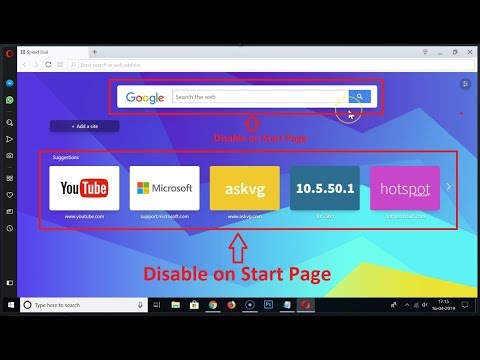
How to Disable Search Box and Speed Dial Suggestions on Start Page in Opera Browser?
ChannelTechMeSpotDescription from the creator
How to Disable Search Box and Speed Dial Suggestions on Start Page in Opera Browser?
Step 1: Open 'Opera Browser'.
Step 2: Go to Address bar and type 'opera://settings' without quotes, and then hit enter.
Step 3: scroll down, and then click on 'Advanced'.
Step 4: Scroll down to 'Start Page'.
Step 5: Under 'Start Page', we have two options 'Hide search box', and 'show speed dial suggestions'.
Step 6: Tap on Toggle next to them to disable that on start page.
It's done.
Thanks for watching, please like and subscribe
==============================================
YouTube Subscribe: goo.gl/4lCCN8
Patreon: patreon.com/TechMeSpot
Facebook: facebook.com/techmespot
Twitter: twitter.com/techmespot
Website: techmespot.com
#howto #DisableSearchBoxInOpera #DisableSpeedDialSuggestionsInOpera
Step 1: Open 'Opera Browser'.
Step 2: Go to Address bar and type 'opera://settings' without quotes, and then hit enter.
Step 3: scroll down, and then click on 'Advanced'.
Step 4: Scroll down to 'Start Page'.
Step 5: Under 'Start Page', we have two options 'Hide search box', and 'show speed dial suggestions'.
Step 6: Tap on Toggle next to them to disable that on start page.
It's done.
Thanks for watching, please like and subscribe
==============================================
YouTube Subscribe: goo.gl/4lCCN8
Patreon: patreon.com/TechMeSpot
Facebook: facebook.com/techmespot
Twitter: twitter.com/techmespot
Website: techmespot.com
#howto #DisableSearchBoxInOpera #DisableSpeedDialSuggestionsInOpera
About this tutorial
TechMeSpot published this 3:03 video tutorial on November 3, 2019. It has been watched 34,399 times on YouTube.
- Channel
- TechMeSpot
- Category
- Howto & Style
- Duration
- 3:03
- Published
- November 3, 2019
- Views
- 34,399
- Likes
- 363
Tags
Share
This tutorial in other languages
- FRComment désactiver le champ de recherche et de composition abrégée Suggestions sur la page de démarrage dans le navigateur Opera?
- ESCómo deshabilitar caja de Búsqueda y marcación rápida Sugerencias en la página de inicio en el navegador Opera?
- PTComo desativar Caixa de pesquisa e Speed Dial Sugestões sobre Iniciar página no Opera Browser?
- ITCome Disable Search Box e Speed Dial Suggerimenti su pagina iniziale in Opera Browser?
- DEWie man Disable Search Box und Geschwindigkeit Vorschläge auf Startseite in Opera Browser Dial?
- NLHoe kan uitschakelen Search Box en Speed Dial Suggesties over startpagina in Opera Browser?
- RUКак отключить окно поиска и быстрый набор Предложения по начальной странице в браузере Opera?
- PLJak wyłączyć Search Box Speed Dial i sugestie na temat strony początkowej w przeglądarce Opera?
- JAどのように無効に検索ボックスとスピードは、Operaブラウザでのスタートページに提案をダイヤルするには?
- ARكيفية تعطيل مربع البحث والاتصال السريع اقتراحات بشأن بدء صفحة في متصفح أوبرا؟
- HIअक्षम खोज बॉक्स और स्पीड कैसे डायल करने के लिए ओपेरा ब्राउज़र में प्रारंभ पृष्ठ पर सुझाव?
- IDCara Nonaktifkan Kotak Pencarian dan Speed Dial Saran tentang Start Page di Opera Browser?