Playback starts YouTube’s embedded player (privacy-enhanced mode).
How to Disable UEFI Secure Boot in Windows 10 64 bit and 32 bit
ChannelDEE ZDescription from the creator
What is UEFI Firmware ?
UEFI (Unified Extensible Firmware Interface) Secure Boot is the boot path validation component of the UEFI specification. It will store embedded validation signature code of the applications like boot loader and drivers etc. Also it will block unknown or bad certificates and application. How ever the signature only verified in the boot stage. The user can enable or disable the UEFI secure option to legacy BIOS compatibility mode with bios setting. Which means, like its older operating system as well as helps to control all the operations, for example Windows 7, XP, Linux, Ubuntu etc..
Windows 8 and windows 10 are not build with old established bios, after the windows 7 all newly build in operating systems are developed with UEFI Firmware .
DONATE TO DEEZ- paypal.me/deezzone
Any amount you can give is welcome..
see how to enable or disable UEFI boot in windows 10.
first you need to enter boot menu. you can start using with "delete " key while booting up or just follow the video.
1: Open Settings
2: Find Change Advanced Start-up option
3: Restart computer from advanced start up
4: select Troubleshoot
5: Advanced Option
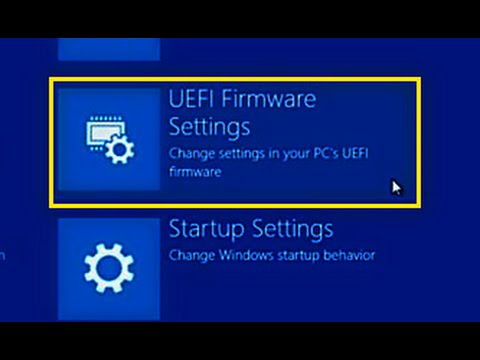
6: UEFI Firmware settings
7: Restart
8: F10
9: System Configuration
10: Boot Option
11: Secure Boot -change enable to Disable
12: F10
13: Press Code + Enter key for changes
This video i made for Educational Purpose Only . [ for more Like and Subscribe]
How to Disable UEFI firmware setting
How to Enable UEFI firmware setting
How to Disable/Enable secure boot policy on windows 10
How to Disable/Enable secure boot policy on windows 8
How to Disable/Enable secure boot policy on windows 8.1
Benefits of UEFI firmware settings
Why Data Execution Prevention not working
How to solve Data Execution Prevention problems
data execution prevention can't turn off
UEFI (Unified Extensible Firmware Interface) Secure Boot is the boot path validation component of the UEFI specification. It will store embedded validation signature code of the applications like boot loader and drivers etc. Also it will block unknown or bad certificates and application. How ever the signature only verified in the boot stage. The user can enable or disable the UEFI secure option to legacy BIOS compatibility mode with bios setting. Which means, like its older operating system as well as helps to control all the operations, for example Windows 7, XP, Linux, Ubuntu etc..
Windows 8 and windows 10 are not build with old established bios, after the windows 7 all newly build in operating systems are developed with UEFI Firmware .
DONATE TO DEEZ- paypal.me/deezzone
Any amount you can give is welcome..
see how to enable or disable UEFI boot in windows 10.
first you need to enter boot menu. you can start using with "delete " key while booting up or just follow the video.
1: Open Settings
2: Find Change Advanced Start-up option
3: Restart computer from advanced start up
4: select Troubleshoot
5: Advanced Option
6: UEFI Firmware settings
7: Restart
8: F10
9: System Configuration
10: Boot Option
11: Secure Boot -change enable to Disable
12: F10
13: Press Code + Enter key for changes
This video i made for Educational Purpose Only . [ for more Like and Subscribe]
How to Disable UEFI firmware setting
How to Enable UEFI firmware setting
How to Disable/Enable secure boot policy on windows 10
How to Disable/Enable secure boot policy on windows 8
How to Disable/Enable secure boot policy on windows 8.1
Benefits of UEFI firmware settings
Why Data Execution Prevention not working
How to solve Data Execution Prevention problems
data execution prevention can't turn off
About this tutorial
DEE Z published this 2:56 video tutorial on November 13, 2016. It has been watched 1,310,935 times on YouTube.
- Channel
- DEE Z
- Category
- Howto & Style
- Duration
- 2:56
- Published
- November 13, 2016
- Views
- 1,310,935
- Likes
- 4,790
Tags
Share
This tutorial in other languages
- FRComment désactiver UEFI Boot sécurisé dans Windows 10 64 bits et 32 bits
- ESCómo deshabilitar UEFI Secure Boot en Windows 10 de 64 bits y 32 bits
- PTComo desativar UEFI seguros de inicialização no Windows 10 de 64 bits e 32 bits
- ITCome disattivare UEFI Secure Boot di Windows 10 a 64 bit e 32 bit
- DEWie zu deaktivieren UEFI Secure Boot in Windows 10 64-Bit und 32-Bit
- NLHoe kan uitschakelen UEFI Secure Boot in Windows 10 64 bit en 32 bit
- RUКак отключить UEFI Secure загрузки в Windows 10 64 бит и 32 бит
- PLJak wyłączyć UEFI Bezpieczne rozruch w systemie Windows 10 64 i 32 bitowego
- JAどのように無効にUEFIセキュアブートへのWindows 10 64ビットおよび32ビットで
- ARكيفية تعطيل UEFI الآمنة التمهيد في نظام التشغيل Windows 10 64 بت و 32 بت
- HIकैसे अक्षम UEFI करने के लिए Windows 10 में बूट को सुरक्षित 64 बिट और 32 बिट
- IDCara Nonaktifkan UEFI Aman Boot pada Windows 10 64 bit dan 32 bit