Playback starts YouTube’s embedded player (privacy-enhanced mode).
How to Send Fax from Computer Without Fax Machine
ChannelHOWTECHDescription from the creator
This video tutorial is going to show you how to send fax from your computer without a fax machine.
Don't forget to check out our site howtech.tv/ for more free how-to videos!
youtube.com/ithowtovids - our feed
facebook.com/howtechtv - join us on facebook
plus.google.com/103440382717658277879 - our group in Google+
Although most people no longer have fax machines at their disposal, it still crucial to learn how to send fax directly from your computer
Step#1 prepare your documents
First, prepare your documents. You can use dedicated software on your computer connected to phone to send your fax.
Step#2 Choose windows fax and scan on your computer
On your computer go to start, then all programs click 'windows fax and scan'
Step#3 Click new to create new fax
Click new. Follow the wizard to connect to your phone line on your server. Enter the fax number on the 'To' field and include the area code. Enter the subject of your fax.
Step#4 Click insert and select file attachment to attach documents
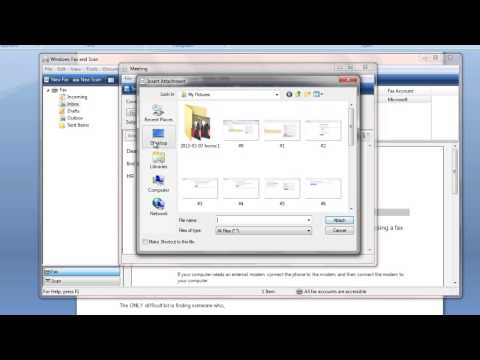
On your menu bar, click insert and select file attachment to attach the document that you are planning to send. Your new attached documents will be displayed below the subject tab.
Step#5 click send once you are done
Once you are done, click send. And here you will have successfully sent fax from computer without fax machine.
Thanks for watching this video tutorial, Leave comments and ask your questions by our e-mail [email protected] was Howtech dot TV tutorial. Thank you for watching!
Don't forget to check out our site howtech.tv/ for more free how-to videos!
youtube.com/ithowtovids - our feed
facebook.com/howtechtv - join us on facebook
plus.google.com/103440382717658277879 - our group in Google+
Although most people no longer have fax machines at their disposal, it still crucial to learn how to send fax directly from your computer
Step#1 prepare your documents
First, prepare your documents. You can use dedicated software on your computer connected to phone to send your fax.
Step#2 Choose windows fax and scan on your computer
On your computer go to start, then all programs click 'windows fax and scan'
Step#3 Click new to create new fax
Click new. Follow the wizard to connect to your phone line on your server. Enter the fax number on the 'To' field and include the area code. Enter the subject of your fax.
Step#4 Click insert and select file attachment to attach documents
On your menu bar, click insert and select file attachment to attach the document that you are planning to send. Your new attached documents will be displayed below the subject tab.
Step#5 click send once you are done
Once you are done, click send. And here you will have successfully sent fax from computer without fax machine.
Thanks for watching this video tutorial, Leave comments and ask your questions by our e-mail [email protected] was Howtech dot TV tutorial. Thank you for watching!
About this tutorial
HOWTECH published this 1:10 video tutorial on October 26, 2013. It has been watched 416,772 times on YouTube.
- Channel
- HOWTECH
- Category
- Howto & Style
- Duration
- 1:10
- Published
- October 26, 2013
- Views
- 416,772
- Likes
- 771
Tags
Share
This tutorial in other languages
- FRComment envoyer fax de l'ordinateur Sans Télécopieur
- ES¿Cómo enviar fax desde el ordenador sin la máquina de fax
- PTComo enviar fax a partir do computador sem máquina de fax
- ITCome inviare fax dal computer senza Fax
- DEWie zum Senden Fax von Computern ohne Faxgerät
- NLHoe kan Fax verzenden computer zonder Fax
- RUКак отправить факс с компьютера без факсимильного аппарата
- PLJak wysłać faks z komputera bez Faks
- JAファックスなくてもコンピュータからファックスを送信する方法
- ARكيفية إرسال فاكس من جهاز الكمبيوتر بدون آلة فاكس
- HIकैसे फैक्स मशीन के बिना कंप्यूटर से फैक्स भेजने के लिए
- IDCara Kirim Fax dari Komputer Tanpa Mesin Fax