The creator does not allow this video to be played on other websites. You can watch it directly on YouTube.
How to Sync Facebook Contacts with iPhone and iPad
ChanneliPhone, iPad and Android Tutorials from HowTechDescription from the creator
Read iSecrets.
New magazine about gadgets and mobile technology.
app.appsflyer.com/id946420218?pid=YouTube&c…
Also check out the best iPhone audiobook library & player
app.appsflyer.com/id575898357?pid=eg_youtube
In this tutorial you will learn how to sync Facebook contacts with iPhone running on iOS 7.
Recognizing the actual trends of the day, iOS7 has a new default when it comes to contacts and contact management: Facebook. Via the Facebook app, iOS 7 will try to reach as many of your Facebook friends as possible and populate your agenda with them. This is both good and bad: good as it acts as the ultimate backup and it's accessible via a single application, and bad when you're still holding Facebook touch with your ex but want him or her deleted from your agenda (memories will come back to haunt you :) ).
Don't forget to check out our site howtech.tv/ for more free how-to videos!
youtube.com/ithowtovids - our feed
facebook.com/howtechtv - join us on facebook
plus.google.com/103440382717658277879 - our group in Google+
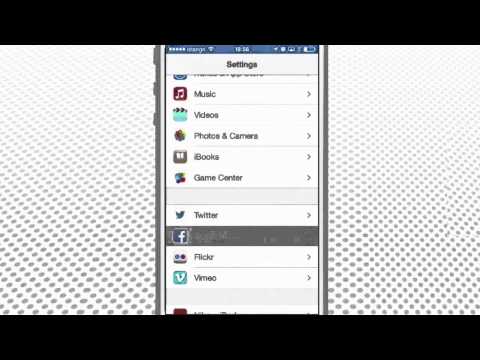
Step 1. In order to set it up completely, you need to install the Facebook app. From Home screen, go to „Settings", „Facebook", and tap „Install" from the upper part of the screen.
Step 2. Once installed, sign in the application with your Facebook credentials. The system asks you to agree with its terms if it's the first time you launch Facebook, otherwise it just logs you into your account.
Step 3. You can choose the things that you want to sync from your Facebook account: „Calendars", „Contacts", or any of the additional services listed, if you have configured any.
Step 4. Whenever you want to stop the sync of your Facebook data, just de-select the „Calendars" or „Contacts" options presented on this screen.
Step 5. Finally, tap on "Update All Contacts" field at the bottom of the screen to create or update the sync.
Result: Your contacts will be updated and will most likely hold the Facebook pictures of the owners -- probably the reason you asked for this updated in the first place :) Enjoy your new Facebook data on your iPhone in iOS7! This was a HowTech tutorial.
Like us on Facebook, love us forever or leave us a comment here in the fields below :)
Thanks for watching!
New magazine about gadgets and mobile technology.
app.appsflyer.com/id946420218?pid=YouTube&c…
Also check out the best iPhone audiobook library & player
app.appsflyer.com/id575898357?pid=eg_youtube
In this tutorial you will learn how to sync Facebook contacts with iPhone running on iOS 7.
Recognizing the actual trends of the day, iOS7 has a new default when it comes to contacts and contact management: Facebook. Via the Facebook app, iOS 7 will try to reach as many of your Facebook friends as possible and populate your agenda with them. This is both good and bad: good as it acts as the ultimate backup and it's accessible via a single application, and bad when you're still holding Facebook touch with your ex but want him or her deleted from your agenda (memories will come back to haunt you :) ).
Don't forget to check out our site howtech.tv/ for more free how-to videos!
youtube.com/ithowtovids - our feed
facebook.com/howtechtv - join us on facebook
plus.google.com/103440382717658277879 - our group in Google+
Step 1. In order to set it up completely, you need to install the Facebook app. From Home screen, go to „Settings", „Facebook", and tap „Install" from the upper part of the screen.
Step 2. Once installed, sign in the application with your Facebook credentials. The system asks you to agree with its terms if it's the first time you launch Facebook, otherwise it just logs you into your account.
Step 3. You can choose the things that you want to sync from your Facebook account: „Calendars", „Contacts", or any of the additional services listed, if you have configured any.
Step 4. Whenever you want to stop the sync of your Facebook data, just de-select the „Calendars" or „Contacts" options presented on this screen.
Step 5. Finally, tap on "Update All Contacts" field at the bottom of the screen to create or update the sync.
Result: Your contacts will be updated and will most likely hold the Facebook pictures of the owners -- probably the reason you asked for this updated in the first place :) Enjoy your new Facebook data on your iPhone in iOS7! This was a HowTech tutorial.
Like us on Facebook, love us forever or leave us a comment here in the fields below :)
Thanks for watching!
About this tutorial
iPhone, iPad and Android Tutorials from HowTech published this 1:52 video tutorial on November 12, 2014. It has been watched 130,402 times on YouTube.
- Category
- Howto & Style
- Duration
- 1:52
- Published
- November 12, 2014
- Views
- 130,402
- Likes
- 163
Tags
Share
This tutorial in other languages
- FRComment synchroniser Facebook Contacts avec l'iPhone et l'iPad
- ESCómo sincronizar contactos de Facebook con el iPhone y el iPad
- PTComo sincronizar contatos do Facebook com iPhone e iPad
- ITCome sincronizzare i contatti di Facebook con iPhone e iPad
- DEWie man Sync Facebook-Kontakte mit iPhone und iPad
- NLHoe te Sync Facebook contacten met iPhone en iPad
- RUКак синхронизировать Facebook Контакты с iPhone и IPad
- PLJak Sync Facebooku Kontakty z iPhone i iPad
- JAどのようにiPhoneとiPadと同期するFacebookの連絡先へ
- ARكيفية مزامنة الفيسبوك اتصالات مع اي فون وتطلب الشركة
- HIकैसे करने के लिए iPhone और iPad के साथ सिंक फेसबुक संपर्क
- IDCara Sync Facebook Kontak dengan iPhone dan iPad