Playback starts YouTube’s embedded player (privacy-enhanced mode).
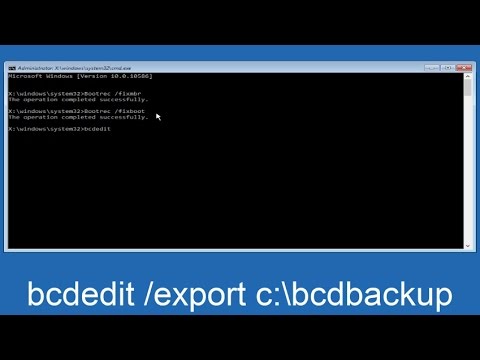
How To Repair Master Boot Record In Windows 7/8/10 - Without CD
ChannelMDTechVideosDescription from the creator
Error: The boot selection failed because a required device is inaccessible.
IMPORTANT: If bootrec/fixboot comes back with "Access Denied", try typing in bootsect/nt60 sys then type the bootrec /fixboot
This tutorial will show you how to fix, reset and repair the master boot record in Windows 7, Windows 8 and Windows 10. If you have boot errors and are having issues booting into Windows, there is a good chance the problem is stemming from the MBR. As I state in the video, as long as you can make it into Safe Mode with Command Prompt functionality, you can follow along with this tutorial.
You might receive the following error alert:
Windows Boot Manager
Windows failed to start. A recent hardware of software change might be the cause.
Status: 0xc000000e
Info: The boot selection failed because a required device is inaccessible.
This tutorial will apply for computers, laptops, desktops,and tablets running the Windows 10, Windows 8/8.1, Windows 7 operating systems.Works for all major computer manufactures (Dell, HP, Acer, Asus, Toshiba, Lenovo, Samsung).
IMPORTANT: If bootrec/fixboot comes back with "Access Denied", try typing in bootsect/nt60 sys then type the bootrec /fixboot
This tutorial will show you how to fix, reset and repair the master boot record in Windows 7, Windows 8 and Windows 10. If you have boot errors and are having issues booting into Windows, there is a good chance the problem is stemming from the MBR. As I state in the video, as long as you can make it into Safe Mode with Command Prompt functionality, you can follow along with this tutorial.
You might receive the following error alert:
Windows Boot Manager
Windows failed to start. A recent hardware of software change might be the cause.
Status: 0xc000000e
Info: The boot selection failed because a required device is inaccessible.
This tutorial will apply for computers, laptops, desktops,and tablets running the Windows 10, Windows 8/8.1, Windows 7 operating systems.Works for all major computer manufactures (Dell, HP, Acer, Asus, Toshiba, Lenovo, Samsung).
About this tutorial
MDTechVideos published this 7:50 video tutorial on November 3, 2017. It has been watched 750,890 times on YouTube.
- Channel
- MDTechVideos
- Category
- Science & Technology
- Duration
- 7:50
- Published
- November 3, 2017
- Views
- 750,890
- Likes
- 3,725
Share
This tutorial in other languages
- FRComment faire pour réparer Master Boot Record Sous Windows 7/8/10 - Sans CD
- ESCómo reparar registro maestro de arranque en Windows 7/8/10 - Sin CD
- PTComo reparar o Master Boot Record No Windows 7/8/10 - sem CD
- ITCome riparare Master Boot Record In Windows 7/8/10 - Senza CD
- DEWie reparieren Master Boot Record In Windows 7/8/10 - ohne CD
- NLHow To Repair Master Boot Record In Windows 7/8/10 - Zonder CD
- RUКак восстановить Master Boot Record В Windows 7/8/10 - без CD
- PLJak naprawić Master Boot Record w oknach 7/8/10 - bez CD
- JACDなしで - マスター・ブート・レコードでのWindows 7/8/10を修復する方法
- ARكيفية إصلاح سجل التمهيد الرئيسي في Windows 7/8/10 - بدون CD
- HIमरम्मत करने के लिए कैसे में विंडोज मास्टर बूट रिकॉर्ड 7/8/10 - सीडी के बिना
- IDCara Perbaikan Master Boot Record Pada Windows 7/8/10 - Tanpa CD