Playback starts YouTube’s embedded player (privacy-enhanced mode).
How to Reshape Text with an Object Warp | Adobe Illustrator
ChannelHowcastDescription from the creator
-
-
Watch more How to Use Adobe Illustrator videos: howcast.com/videos/513796-How-to-Reshape-Text-w…
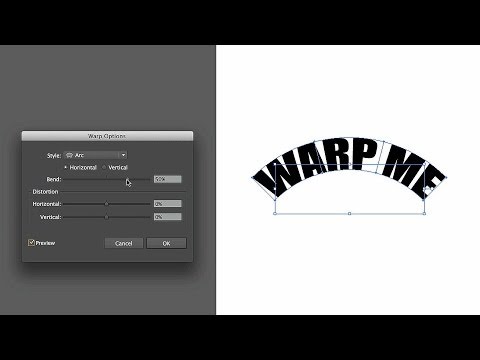
This is how to reshape text with an object warp in Adobe Illustrator. So sometimes you have text on your art board, and you want to warp, or alter, or distort the way it looks. And Illustrator has an option that allows you to actually add a couple of effects that warp and distort the actual text itself. Without directly affecting the text itself. So what we do is, we select the text on our art board. We go to our object menu. And we go down to develop, distort, and we go to make with warp. And when we click that, we'll notice that we have some warp options that come up. And the first one, that is set by default because it's at the top, is called arc. And there's a little symbol or shape in each one that pretty much gives you an idea of what it's going to look like once it gets warped. So we click on the preview button. And you'll notice that once we click this, the warp text that's on our art board, is going to arc.
And then you can also change the bend. You can make it so that it bends under, farther, or over, really far. And then you can change the distortion. Whether or not you want it to be horizontal to the right, horizontal to the left, you want the majority to be vertical on the top, vertical on the bottom. And you can also change overall orientation from horizontal to vertical, and it will warp. And you're going to get all kinds of crazy output. But you can always change it. So usually you want to make sure it's not all the way to end of the horizontal or vertical when you start. But once you have it there, you can change the size of that warp, make the bend smaller, larger, and you can see how that affects it.
And that's how we reshape text with an object warp in Adobe Illustrator.
About this tutorial
Howcast published this 2:17 video tutorial on October 25, 2014. It has been watched 278,861 times on YouTube.
- Channel
- Howcast
- Category
- Science & Technology
- Duration
- 2:17
- Published
- October 25, 2014
- Views
- 278,861
- Likes
- 2,035
Tags
Share
Further reading
-
How to adjust appearance attributes in Illustrator
helpx.adobe.com
Appearance attributes are properties that affect the look of an object without altering its underlying structure. Appearance attributes include fills, strokes, transparency, and effects. If you apply an appearance attri…
-
Adobe Illustrator
helpx.adobe.com
Overview of printing in Adobe Illustrator. The printing workflow is sometimes complex. Begin by understanding the setup required and then navigate to subjects of interest.
-
Free Illustrator | Download Adobe Illustrator full version
adobe.com
Adobe Illustrator is the industry-standard vector graphics software that’s used by millions of designers and artists to create everything from gorgeous web and mobile graphics to logos, icons, book illustrations, produc…
This tutorial in other languages
- FRComment Reshape texte avec une chaîne d'objets | Adobe Illustrator
- ESCómo Cambiar la forma de texto con una deformación de objetos | Ilustrador Adobe
- PTComo remodelar texto com uma urdidura Objeto | Adobe Illustrator
- ITCome Reshape testo con un filo di ordito Object | Adobe Illustrator
- DEWie man Reshape Text mit einem Objekt Warp | Adobe Illustrator
- NLHoe te Reshape tekst een object Warp | Adobe Illustrator
- RUКак перекроить текст с Деформации Object | Adobe Illustrator
- PLJak do przekształcenia tekstu z Warp Object | Adobe Illustrator
- JAどのようにオブジェクトのワープと形状変更テキストへ|アドビイラストレーター
- ARكيفية إعادة تشكيل النص مع الاعوجاج كائن | أدوبي المصور
- HIकैसे एक वस्तु वार्प साथ नयी आकृति प्रदान करने के लिए पाठ | एडोब इलस्ट्रेटर
- IDCara Pembentuk Teks dengan Warp Object | Adobe Illustrator