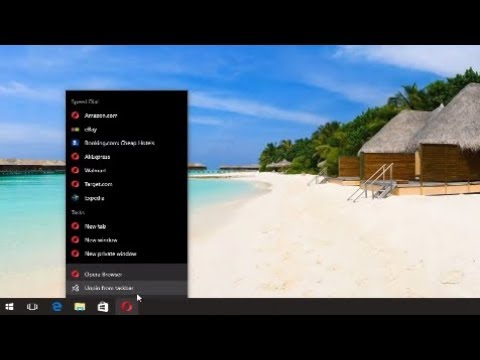
Playback starts YouTube’s embedded player (privacy-enhanced mode).
How To Add And Remove Program Icons From Taskbar In Windows 10
ChannelMDTechVideosDescription from the creator
The Windows 10 taskbar works much like previous Windows versions, offering shortcuts and icons for every running app. Windows 10 offers all kinds of ways to customize the taskbar to your liking, and we’re here to guide you through what you can do.
We’ve taken a look at customizing the Start menu and the Action Center in Windows 10. Now, it’s time to tackle the taskbar. With just a little bit of work, you can tweak the taskbar to get it running just how you like it.
Pin Apps to the Taskbar
This will immediately add a new shortcut for the app to the taskbar. To remove an app from the taskbar, just right-click the pinned app and choose the “Unpin from taskbar” option.
Pin a File or Folder to Taskbar Jump Lists
Windows also provides an easy way to get access to folders—and individual files—on your taskbar. Jump lists are handy context menus associated with each pinned app that show certain actions you can perform with the app and, for apps where it’s applicable, also show a list of recent files and folders you’ve accessed.u can view an app’s jump list by right-clicking an icon. For example, the jump list for the File Explorer icon lets you open a new File Explorer window and shows recent folders you’ve viewed and folders you’ve pinned. Just point your mouse at a recent item to reveal a pushpin icon to its right. Click the pushpin to pin the item to the jump list.
The second way to pin an app to the taskbar does not require the app to be running first. Find the app on the Start menu, right-click the app, point to “More,” and then choose the “Pin to taskbar” option you find there. You could also drag the app icon to the taskbar if you prefer doing it that way.
By the way, if you want to view the conventional context menu for an icon on the taskbar, hold the Shift key while right-clicking the icon. This is particularly useful for configuring any folder shortcuts you’ve pinned there. And this is just one of the many useful keyboard shortcuts you can use with the taskbar.
When you’ve pinned items to a jump list, those items appear separately from recent items. All you have to do is click one of them to open that folder. And of course, exactly what you see on a jump list depends on the app. Apps like Notepad or Microsoft Word show recently opened files. A jump list for your browser might show favorite sites and provide actions for opening new tabs or windows.
The simplest way to customize your taskbar is by pinning various apps and shortcuts to it so that you can access them more quickly in the future. There are two ways to do this. The first is to open the program, either from the Start menu or an existing shortcut. When the app’s icon appears on the taskbar to indicate it’s running, right-click the icon and select the “Pin to taskbar” option from the context menu.
By default, Windows 10 shows about 12 recent items in jump lists. In previous versions of Windows, you could increase or decrease that number easily through taskbar properties. Windows 10, for some reason, does not have this feature easily accessible. You can, however, change the number of items shown on jump lists with a quick Registry modification.
Configure or Remove Cortana
The Cortana search box takes up a lot of room on the taskbar and you don’t actually need it to do your searching. Even without it, if you press the Windows key and start typing, you’ll get the same search experience. If you want to perform a voice search—normally accessed by clicking the microphone icon in the search box—you just have to press Windows+C on your keyboard instead.
You can remove the search box and leave just the icon, or you can remove both entirely. Right-click the taskbar and choose “Cortana", then Show Cortana icon” from the pop-up menu.
This tutorial will apply for computers, laptops, desktops,and tablets running the Windows 10 operating system (Home, Professional, Enterprise, Education) from all supported hardware manufactures, like Dell, HP, Acer, Asus, Toshiba,Lenovo, and Samsung).
About this tutorial
MDTechVideos published this 1:56 video tutorial on October 26, 2017. It has been watched 179,043 times on YouTube.
- Channel
- MDTechVideos
- Category
- Science & Technology
- Duration
- 1:56
- Published
- October 26, 2017
- Views
- 179,043
- Likes
- 859
Tags
Share
Further reading
-
Trying to remove program icons displaying on Windows 10 ...
answers.microsoft.com
Trying to remove program icons displaying on Windows 10 taskbar On the right side of my taskbar icons of programs installed on my PC display. There is a '>>' marker which, if I click it, will display a larger, longer po…
-
How to add or remove an icon on the Windows taskbar
computerhope.com
Windows 7, 8, and 10. Pin an already open program. Pin from Start menu. Drag-and-drop a shortcut. Removing shortcuts from the taskbar. Pin an already open program. If the program is open, pin it to the taskbar by right-…
-
How to Add Apps to Taskbar or Remove Them in Windows 10 - My ...
myofficetricks.com
Since I’ve shared the former approach, here I’d like to introduce how to pin apps to taskbar in Windows 10. 1. Holding your mouse and dragging the app (either the EXE file or the desktop shortcut) to the taskbar. You’ll…
This tutorial in other languages
- FRComment ajouter et supprimer des icônes du programme De Taskbar Dans Windows 10
- ESCómo agregar y quitar iconos de programa desde la barra de tareas en Windows 10
- PTComo adicionar e remover ícones do programa a partir da barra de tarefas no Windows 10
- ITCome aggiungere e rimuovere icone dei programmi dalla barra delle applicazioni in Windows 10
- DEWie zum Hinzufügen und Entfernen von Programmsymbolen Von Taskleiste in Windows 10
- NLHoe toevoegen en verwijderen Programma iconen uit de taakbalk in Windows 10
- RUКак добавить и удалить значки программы из панели задач в Windows 10
- PLJak dodawać i usuwać ikony programu z paska zadań w systemie Windows 10
- JAタスクバーのWindowsの10からプログラムアイコンを追加および削除する方法
- ARكيفية إضافة وإزالة الرموز البرنامج من شريط المهام في ويندوز 10
- HIकैसे जोड़ें और टास्कबार में Windows 10 से कार्यक्रम प्रतीक निकालें
- IDCara Tambah dan Hapus Program Ikon Dari Taskbar Pada Windows 10