Playback starts YouTube’s embedded player (privacy-enhanced mode).
How to Create a Packaging Design Mockup in Photoshop
ChannelPHLEARNChapters
Description from the creator
▶ Download the practice files for this tutorial (free with a PHLEARN account): phlearn.com/tutorial/create-packaging-design-mo…
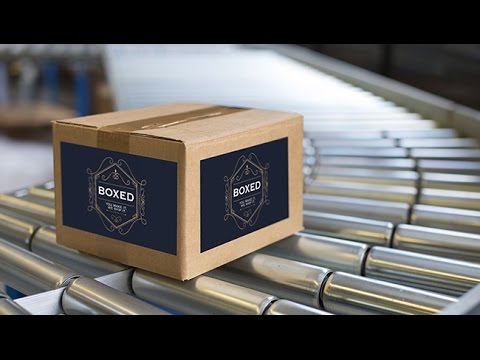
Learn how to create a packaging design mockup in Photoshop, placing a logo onto a box in perfect perspective with Vanishing Point.
Clients always want to see a logo on the actual product. This tutorial covers pasting a logo onto multiple sides of a box using the Vanishing Point filter, then blending it in with a touch of blur so it reads as photographed, not pasted.
CHAPTERS
00:00 Mocking up a logo onto packaging
00:01:36 Copying the logo to the clipboard
00:04:00 Mapping a perspective plane in Vanishing Point
00:05:38 Pasting the logo into perspective
00:09:11 Extending the logo onto a second plane
00:14:41 Blurring the logo for a realistic finish
THE STEPS
1. Copy your logo layer to the clipboard, then hide it
2. On a new layer, go to Filter, then Vanishing Point
3. Click the corners of the box to create a perspective plane
4. Paste the logo in, and it snaps into that perspective automatically
5. Build a second plane from the first to wrap the logo onto another side
6. Convert the layer to a Smart Object and add a light blur so it matches the photo
Read PHLEARN's full guide to this technique here: phlearn.com/tutorial/create-packaging-design-mo…
―
PHLEARN PRO: every PRO tutorial, one membership
◦ 200+ in-depth courses and masterclasses on Photoshop, Lightroom and photography
◦ 1,000+ downloadable PSDs, RAW images and sample files to follow along
◦ Presets, Photoshop actions and LUTs included
◦ New PRO tutorials every month, streamed in 4K with captions and chapters
◦ Rated 4.93/5 by 3,900+ students
◦ Cancel anytime, 100% money-back guarantee
▶ phlearn.com/pro
―
Follow PHLEARN:
Instagram: instagram.com/phlearn/
Facebook: facebook.com/PHLEARN/
Twitter: twitter.com/PHLEARN
#Photoshop #Mockup #GraphicDesign
Learn how to create a packaging design mockup in Photoshop, placing a logo onto a box in perfect perspective with Vanishing Point.
Clients always want to see a logo on the actual product. This tutorial covers pasting a logo onto multiple sides of a box using the Vanishing Point filter, then blending it in with a touch of blur so it reads as photographed, not pasted.
CHAPTERS
00:00 Mocking up a logo onto packaging
00:01:36 Copying the logo to the clipboard
00:04:00 Mapping a perspective plane in Vanishing Point
00:05:38 Pasting the logo into perspective
00:09:11 Extending the logo onto a second plane
00:14:41 Blurring the logo for a realistic finish
THE STEPS
1. Copy your logo layer to the clipboard, then hide it
2. On a new layer, go to Filter, then Vanishing Point
3. Click the corners of the box to create a perspective plane
4. Paste the logo in, and it snaps into that perspective automatically
5. Build a second plane from the first to wrap the logo onto another side
6. Convert the layer to a Smart Object and add a light blur so it matches the photo
Read PHLEARN's full guide to this technique here: phlearn.com/tutorial/create-packaging-design-mo…
―
PHLEARN PRO: every PRO tutorial, one membership
◦ 200+ in-depth courses and masterclasses on Photoshop, Lightroom and photography
◦ 1,000+ downloadable PSDs, RAW images and sample files to follow along
◦ Presets, Photoshop actions and LUTs included
◦ New PRO tutorials every month, streamed in 4K with captions and chapters
◦ Rated 4.93/5 by 3,900+ students
◦ Cancel anytime, 100% money-back guarantee
▶ phlearn.com/pro
―
Follow PHLEARN:
Instagram: instagram.com/phlearn/
Facebook: facebook.com/PHLEARN/
Twitter: twitter.com/PHLEARN
#Photoshop #Mockup #GraphicDesign
About this tutorial
PHLEARN published this 18:39 video tutorial on November 11, 2016. It has been watched 356,948 times on YouTube.
Share
This tutorial in other languages
- FRComment créer un Design Packaging Mockup dans Photoshop
- ESCómo crear una maqueta Diseño de Packaging en Photoshop
- PTComo criar um protótipo do design de embalagem em Photoshop
- ITCome creare un design Mockup Packaging in Photoshop
- DEWie ein Verpackungsdesign Mockup in Photoshop erstellen
- NLHoe maak je een Packaging Design mockup in Photoshop aanmaken
- RUКак создать дизайн упаковки Макет в Photoshop
- PLJak utworzyć projekt opakowania makieta w Photoshopie
- JAPhotoshopでパッケージデザインモックアップを作成する方法
- ARكيفية إنشاء تصميم الأغلفة نموذج بالحجم الطبيعي في فوتوشوب
- HIकैसे Photoshop में एक पैकेजिंग डिजाइन mockup बना करने के लिए
- IDCara Membuat Desain Mockup Kemasan di Photoshop