Playback starts YouTube’s embedded player (privacy-enhanced mode).
How to Adjust Folder Settings in Windows 7
ChannelHOWTECHDescription from the creator
This tutorial will show you how to adjust the folder settings in Windows 7.
Don't forget to check out our site howtech.tv/ for more free how-to videos!
youtube.com/ithowtovids - our feed
facebook.com/howtechtv - join us on facebook
plus.google.com/103440382717658277879 - our group in Google+
When it comes to folder settings windows 7 allows a great deal of customization. This can make the whole system easier to use and this tutorial will show you how to change these settings.
Step # 1 -- Expose the Menu Bar
You need to access the "Menu Bar" first in order to get to folder settings. Click "Start" then "Computer" to open Explorer. Click on the "Organize" button in the top left. Navigate to "Layout" and click "Menu bar". This will add a new bar to the top of the screen that reads "File", "Edit" etc.
Step # 2 -- General Folder Settings
On this new bar click the "Tools" heading and then click on "Folder options...". This will open a window that will allow you to change "General" settings for all folders in the first tab. This will allow you to adjust various navigation settings such as how new windows open.
Step # 3 -- Changing a Folder's View
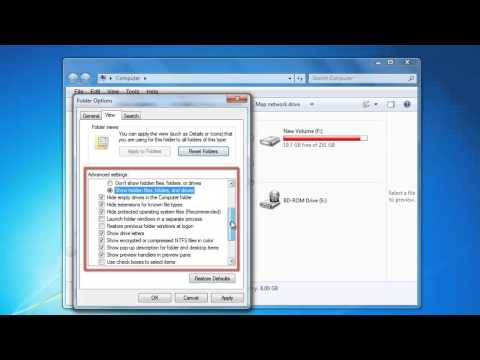
The second tab, "View" allows you to change the appearance of this folder, such as selecting what type of files you want to be able to view, or whether you want to view drive letters. To save any changes you have made click, "OK".
Step # 4 -- Changing all Folders on a Drive
To change all folder settings windows makes the process simple. You first need to go a root directory. Go to computer and then select a drive, such as "C:". Click "Tools", then "Folder options...". The same window as above will appear, click the "View" tab, make any changes you want and before and then click the "Apply to Folders" button, click "Yes" on the dialogue box that appears, this will change all folder settings within the C: drive.
Don't forget to check out our site howtech.tv/ for more free how-to videos!
youtube.com/ithowtovids - our feed
facebook.com/howtechtv - join us on facebook
plus.google.com/103440382717658277879 - our group in Google+
When it comes to folder settings windows 7 allows a great deal of customization. This can make the whole system easier to use and this tutorial will show you how to change these settings.
Step # 1 -- Expose the Menu Bar
You need to access the "Menu Bar" first in order to get to folder settings. Click "Start" then "Computer" to open Explorer. Click on the "Organize" button in the top left. Navigate to "Layout" and click "Menu bar". This will add a new bar to the top of the screen that reads "File", "Edit" etc.
Step # 2 -- General Folder Settings
On this new bar click the "Tools" heading and then click on "Folder options...". This will open a window that will allow you to change "General" settings for all folders in the first tab. This will allow you to adjust various navigation settings such as how new windows open.
Step # 3 -- Changing a Folder's View
The second tab, "View" allows you to change the appearance of this folder, such as selecting what type of files you want to be able to view, or whether you want to view drive letters. To save any changes you have made click, "OK".
Step # 4 -- Changing all Folders on a Drive
To change all folder settings windows makes the process simple. You first need to go a root directory. Go to computer and then select a drive, such as "C:". Click "Tools", then "Folder options...". The same window as above will appear, click the "View" tab, make any changes you want and before and then click the "Apply to Folders" button, click "Yes" on the dialogue box that appears, this will change all folder settings within the C: drive.
About this tutorial
HOWTECH published this 1:56 video tutorial on October 29, 2013. It has been watched 201,181 times on YouTube.
- Channel
- HOWTECH
- Category
- Howto & Style
- Duration
- 1:56
- Published
- October 29, 2013
- Views
- 201,181
- Likes
- 621
Share
This tutorial in other languages
- FRComment régler les paramètres des dossiers dans Windows 7
- ESCómo ajustar la configuración de carpeta en Windows 7
- PTComo ajustar as definições de pastas no Windows 7
- ITCome regolare le impostazioni delle cartelle in Windows 7
- DESo stellen Ordner-Einstellungen in Windows 7
- NLHoe aan te passen Mapinstellingen in Windows 7
- RUКак настроить параметры папки в ОС Windows 7
- PLJak dopasować ustawienia folderów w Windows 7
- JAWindowsでフォルダの設定を調整する方法7
- ARكيفية ضبط إعدادات المجلدات في ويندوز 7
- HIकैसे Windows में फ़ोल्डर सेटिंग समायोजित करने के लिए 7
- IDCara Mengatur Folder Settings di Windows 7