Playback starts YouTube’s embedded player (privacy-enhanced mode).
How to using Sum and AutoSum in Excel 2010
ChannelBest Video Tutorials and Help from HowTechDescription from the creator
Learn how to work with sum and autosum functions in Excel. Knowing how to work with them can help you greatly in your calculations.
Don't forget to check out our site howtech.tv/ for more free how-to videos!
youtube.com/ithowtovids - our feed
facebook.com/howtechtv - join us on facebook
plus.google.com/103440382717658277879 - our group in Google+
Whenever you have to work with tons of numbers and make various calculations, use the sum function in Excel to make your task easy. You can also apply autosum in excel to make calculations for you. Furthermore in this tutorial, we will show you how to check these functions at a glance for any errors that might exist. Follow this step by step guide and master the sum functions that Excel has to offer.
In this tutorial, we will show you how to add numbers using Sum and AutoSum in Excel.
Step # 1 -- Use the Sum function
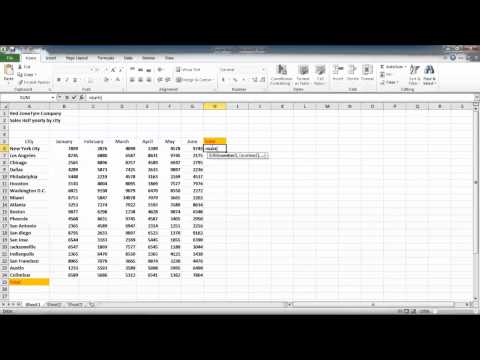
Calculating the sum of many values can often be a complex task. You can use the sum function in excel to ease up your task. In order to do so, go to the cell where you want the total value to appear and type "=SUM( and select all the cells you want to add up and press the "enter" key.
Step # 2 -- Use the AutoSum function
Once done, go to the next cell and click on the "auto sum" button given under the "home" tab. Microsoft Excel will now automatically enter the formula here. In this manner, you can apply autosum in excel.
Step # 3 -- Check the functions
You can choose to manually select the rows you want to sum up and press the "ctrl" key and tilde to check the functions. Now go to column B to add them and use the "auto sum" function.
Don't forget to check out our site howtech.tv/ for more free how-to videos!
youtube.com/ithowtovids - our feed
facebook.com/howtechtv - join us on facebook
plus.google.com/103440382717658277879 - our group in Google+
Whenever you have to work with tons of numbers and make various calculations, use the sum function in Excel to make your task easy. You can also apply autosum in excel to make calculations for you. Furthermore in this tutorial, we will show you how to check these functions at a glance for any errors that might exist. Follow this step by step guide and master the sum functions that Excel has to offer.
In this tutorial, we will show you how to add numbers using Sum and AutoSum in Excel.
Step # 1 -- Use the Sum function
Calculating the sum of many values can often be a complex task. You can use the sum function in excel to ease up your task. In order to do so, go to the cell where you want the total value to appear and type "=SUM( and select all the cells you want to add up and press the "enter" key.
Step # 2 -- Use the AutoSum function
Once done, go to the next cell and click on the "auto sum" button given under the "home" tab. Microsoft Excel will now automatically enter the formula here. In this manner, you can apply autosum in excel.
Step # 3 -- Check the functions
You can choose to manually select the rows you want to sum up and press the "ctrl" key and tilde to check the functions. Now go to column B to add them and use the "auto sum" function.
About this tutorial
Best Video Tutorials and Help from HowTech published this 1:05 video tutorial on October 29, 2012. It has been watched 239,544 times on YouTube.
- Category
- Howto & Style
- Duration
- 1:05
- Published
- October 29, 2012
- Views
- 239,544
- Likes
- 320
Share
This tutorial in other languages
- FRComment l'utilisation Somme et AutoSum dans Excel 2010
- ESCómo usar Sum y Autosuma en Excel 2010
- PTComo usar Sum e AutoSum no Excel 2010
- ITCome utilizzare Somma e Somma automatica in Excel 2010
- DEWie man mit Sum und AutoSum in Excel 2010
- NLHoe kan ik met behulp van Sum en AutoSum in Excel 2010
- RUКак с помощью Sum и Автосумма в Excel 2010
- PLJak za pomocą sumy, a AutoSum w programie Excel 2010
- JAどのようにExcelの2010年に合計し、オートSUMを使用します
- ARكيفية استخدام مبلغ وجمع تلقائي في Excel 2010
- HIकैसे Excel 2010 में योग और AutoSum का उपयोग करने के
- IDCara menggunakan Sum dan AutoSum di Excel 2010